


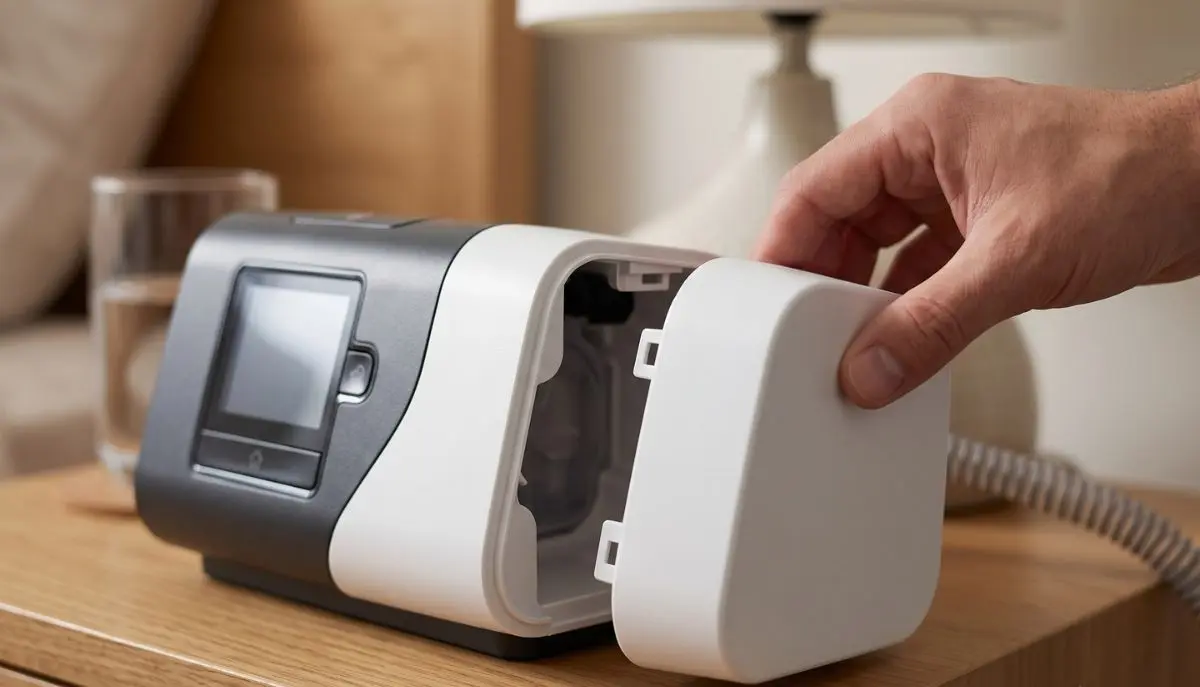
If you use a ResMed AirSense 11 CPAP or AirCurve 11 bilevel machine, you may already know that the humidifier is an important part of the system. But what if you do not want to use the humidifier every night? What if you are traveling and want a simpler setup? Or what if your HumidAir water tub is temporarily unavailable?
This is where a side cover for AirSense 11 CPAP & AirCurve 11 bilevel machines can be useful.
The ResMed Air11 side cover is a replacement accessory designed to fit in the area normally occupied by the HumidAir 11 water tub. ResMed lists the Air11 side cover under part number 39226. It allows compatible Air11 therapy devices to operate without the HumidAir humidifier installed.
For many CPAP and bilevel users, the side cover is a small accessory that solves a simple problem. It can make a machine setup more convenient when humidification is not needed or when the user wants a more straightforward travel configuration.
At Alfa Healthcare Supply Inc., we understand that replacing a small CPAP component can sometimes feel confusing. You want to know whether you have the correct part, whether it fits your machine, and how it should be used. This guide explains those questions in simple language.
What is the Side Cover for AirSense 11 and AirCurve 11?
The side cover for AirSense 11 CPAP & AirCurve 11 bilevel machines is an accessory that covers the opening where the humidifier water chamber normally attaches.
ResMed describes the component as an Air11 side cover or end cap, with model/part number 39226.
Normally, an AirSense 11 or AirCurve 11 can be used with a HumidAir 11 water tub for heated humidification. When the humidifier is not being used, the side cover can be installed instead.
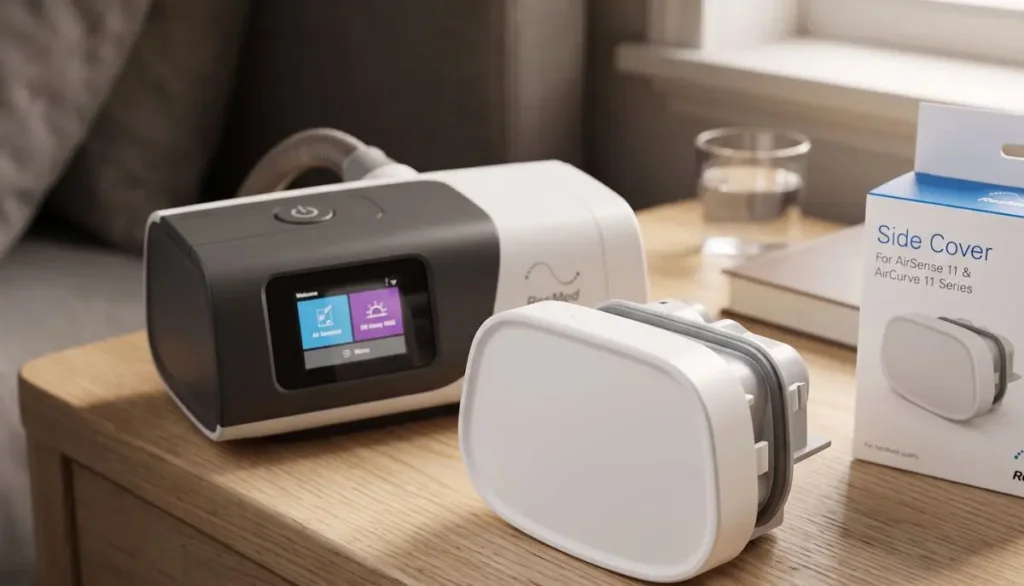
The cover provides a finished closure for that section of the machine and allows the compatible device to operate without the humidifier water chamber.
In simple terms:
Water tub installed = humidification setup
Side cover installed = non-humidified setup
This makes the side cover particularly useful for people who sometimes prefer humidification and sometimes do not.
Why Would Someone Need an AirSense 11 Side Cover?
Not every CPAP user needs heated humidification.
Some people are comfortable using their therapy without adding moisture to the airflow. Others may only use humidification during certain seasons. A person who travels frequently may also prefer a simpler setup.
ResMed specifically explains that the AirSense 11 side cover can replace the humidifier water tub and allow the device to operate without the humidifier.
There are several everyday situations in which this accessory may be useful.
1. You Do Not Want to Use the Humidifier
Some CPAP users find that they do not need added humidity.
If your healthcare professional has advised that your therapy can be used without humidification, the side cover provides a practical way to close the humidifier compartment.
2. You Are Traveling
Travel is one of the most common reasons people consider a side cover.
A water tub requires additional handling. You may need to empty it, dry it, protect it from spills, and pack it separately.
Using the side cover instead can create a simpler configuration when humidification is not required.
That does not mean every traveler should stop using humidification. Comfort needs are personal, and anyone who depends on humidification should consider their normal therapy routine before changing it.
3. Your Humidifier Tub Is Temporarily Unavailable
Sometimes a water chamber may be damaged, misplaced, or unavailable.
The side cover can provide an alternative for compatible Air11 machines when the humidifier is not being used.
4. You Want a Simpler Nightstand Setup
Some users prefer fewer components around their CPAP machine.
Without the water tub, there is no humidifier chamber to fill before bedtime. The setup can therefore feel more straightforward.
5. Seasonal Use
Some people prefer humidification during dry winter weather but do not use it during more humid months.
A side cover makes it easier to switch between configurations when appropriate.
Side Cover vs. HumidAir 11 Water Tub
The side cover and HumidAir 11 water tub serve different purposes.
The HumidAir 11 water tub is part of the humidification system. The side cover is used when the humidifier water tub is not installed.
Here is a simple comparison:
| Feature | Air11 Side Cover | HumidAir 11 Water Tub |
| Main purpose | Covers humidifier opening | Holds water for humidification |
| Water required | No | Yes, when humidification is used |
| Humidification | Not used | Available |
| Part number | 39226 | Various HumidAir 11 tub models |
| Useful for travel | Can simplify setup | Requires water-tub handling |
| Compatible system | Air11 devices | Air11 devices |
| Cleaning | Simple surface care | Requires water-tub cleaning |
The important point is that the side cover is not a humidifier replacement that provides moisture. Instead, it allows the machine to be used without the humidifier water tub.
ResMed’s product information states that an AirSense 11 device needs either the HumidAir 11 tub or the side cover fitted for operation.
Is the Side Cover Compatible With AirSense 11?
Yes. The ResMed Air11 side cover, part 39226, is designed for the AirSense 11 family.
ResMed’s accessory documentation lists the Air11 side cover as part number 39226.
AirSense 11 models include machines such as the AirSense 11 AutoSet and other AirSense 11 configurations.
However, it is always important to verify the exact machine model before ordering a replacement component.
Do not assume that a side cover designed for an older ResMed generation will fit an AirSense 11.
The Air11 platform uses its own accessories, and ResMed’s documentation distinguishes Air11 accessories from older Air10 accessories.
Is It Compatible With AirCurve 11 Bilevel Machines?
The side cover for AirSense 11 CPAP & AirCurve 11 bilevel machines is also associated with the AirCurve 11 family.
ResMed’s AirCurve 11 accessory ordering information lists the Air11 side cover, model 39226.
AirCurve 11 machines are bilevel therapy devices. ResMed describes AirCurve 11 devices as providing different pressure levels for inhalation and exhalation.
Although AirSense 11 and AirCurve 11 serve different therapy needs, they belong to the Air11 platform and share certain accessories.
This is why checking the model and accessory part number is important before purchasing.
ResMed Air11 Side Cover Part Number
One of the most important details to check when ordering is the part number.
ResMed Air11 Side Cover
Part Number: 39226
ResMed’s current accessories documentation identifies 39226 as the Air11 side cover/end cap.
ResMed’s AirCurve 11 product documentation also lists:
Air11 side cover — 39226
If you are replacing a missing or damaged cover, checking the part number can help reduce the chance of ordering the wrong accessory.
What Does the Air11 Side Cover Do?
The side cover has a straightforward purpose.
It covers the opening where the HumidAir water tub normally attaches.
When properly installed, it allows the compatible machine to operate without the humidifier water tub.
ResMed’s product description says the side cover can be used to replace a damaged cover or to operate an AirSense 11 without the humidifier.
This is especially useful because the machine should not simply be operated with an open humidifier compartment.
The correct cover provides the intended closure.
Does the Side Cover Turn Off the Humidifier?
Yes.
The side cover is designed for use when the humidifier is not being used. When it replaces the humidifier water tub, the humidification function is not available.
Third-party product documentation for the ResMed 39226 side cover describes the cover as automatically disabling the humidifier when installed.
Some product documentation also notes that heated humidification-related controls are unavailable when the side cover is installed.
If you want to use humidification again, you can switch back to the appropriate HumidAir water tub.
Does the Side Cover Work With Heated Tubing?
This is an important question.
The ClimateLineAir 11 heated tube is designed to work with Air11 devices, including AirSense 11 and AirCurve 11. ResMed confirms this compatibility on its current humidification and tubing page.
However, using a side cover means the humidifier is not operating.
Therefore, you should not expect the same humidification function that you receive when the HumidAir water tub is installed.
If you are using a ClimateLineAir 11 heated tube and changing from a humidified configuration to a non-humidified configuration, follow the machine’s user instructions and your healthcare provider’s guidance.
How to Install the AirSense 11 Side Cover
Installing the side cover is generally straightforward, but the machine should be handled carefully.
A simple process is:
Step 1: Turn Off the Machine
Before changing accessories, turn off your AirSense 11 or AirCurve 11.
For additional safety, follow the device manufacturer’s instructions for disconnecting the equipment from power when removing components.
Step 2: Remove the HumidAir Water Tub
If the water chamber is installed, remove it according to the machine’s instructions.
Do not force the water tub out.
Step 3: Check the Connection Area
Look at the opening where the humidifier tub was installed.
Make sure the area is clean and free from obvious debris.
Step 4: Position the Side Cover
Place the Air11 side cover into the appropriate opening.
The cover should fit correctly without excessive pressure.
Step 5: Make Sure It Is Secure
ResMed’s product information indicates that the side cover should click into place when inserted.
Do not operate the machine if the cover is loose, damaged, or improperly fitted.
Step 6: Check the Machine
Once the side cover is properly installed, check the machine before beginning therapy.
If the device displays an error or does not function normally, stop and consult the appropriate user guide or healthcare provider/service provider.
How Do I Remove the Side Cover?
Removing the side cover is generally the reverse of installation.
First, turn the machine off.
Then carefully remove the side cover according to the device instructions.
Avoid pulling aggressively or using tools to pry the cover loose.
After removal, the appropriate HumidAir 11 water tub can be installed if humidification is needed and appropriate for your therapy.
Always make sure the replacement component is properly seated before operating the machine.
Can I Use AirSense 11 Without Water?
Yes, the AirSense 11 can be configured to operate without the HumidAir water tub when the appropriate side cover is installed.
This does not mean that every person should stop using humidification.
Some people experience dryness, nasal irritation, congestion, or discomfort when using PAP therapy without humidification. ResMed notes that dry mouth and stuffy nose can be common CPAP side effects and offers humidification accessories to help make airflow more comfortable.
If you are comfortable without humidification, your clinician may consider that configuration appropriate.
If removing humidification makes therapy uncomfortable, talk with your healthcare professional about your options.
Can You Use the AirCurve 11 Without the Humidifier?
The AirCurve 11 platform also supports the Air11 side cover accessory.
ResMed lists 39226 as the Air11 side cover in its AirCurve 11 accessory information.
The basic concept is the same:
HumidAir tub installed → humidifier configuration
Air11 side cover installed → no humidifier water tub
If you use an AirCurve 11 bilevel machine and are considering changing how you use humidification, speak with your healthcare provider if you are unsure whether the change is appropriate for your therapy.
Is the Side Cover Useful for Travel?
For some people, yes.
Travel can make CPAP therapy feel more complicated than it needs to be.
A water chamber adds another component to pack. You may also need to think about emptying and drying the chamber before putting your equipment into a travel bag.
If you normally sleep comfortably without humidification, an Air11 side cover can create a simpler configuration.
It can also help avoid carrying water for the humidifier.
However, if humidification is important to your comfort or therapy routine, do not remove it simply to make packing easier.
Good CPAP travel equipment is ultimately about maintaining a setup that you can use comfortably and consistently.
What If My Side Cover Is Lost?
A lost side cover is not something you should ignore.
If you remove the HumidAir water tub, the machine should have the correct side cover installed rather than being left open.
The AirSense 11 side cover is specifically designed for this purpose. ResMed states that an AirSense 11 will not work unless it is fitted with either the HumidAir 11 water tub or the side cover.
If your cover is missing, look for the correct Air11 replacement part.
When ordering, verify:
- Manufacturer
- Machine model
- Air11 generation
- Part number
- Compatibility
- Condition of the replacement part
The ResMed part number to look for is 39226.
What If My Side Cover Is Cracked?
A cracked side cover should be replaced if it no longer fits securely.
Do not try to repair a damaged cover with household glue, tape, or another improvised method.
A replacement accessory is a better approach because the cover is designed specifically for the machine.
Before ordering, compare the replacement part with your machine and confirm compatibility.
If you are unsure, ask your DME supplier or healthcare equipment provider to verify the correct part.
Side Cover vs. Air Outlet: Do Not Confuse Them
The Air11 side cover and air outlet are different components.
ResMed’s current accessories guide lists both:
- Air11 side cover — 39226
- Air11 air outlet — 39220
The side cover closes the humidifier area.
The air outlet is part of the airflow connection system.
Because these components have different functions, they should not be substituted for each other.
When shopping for replacement parts, always check the product name and part number.
Side Cover vs. Filter Door
The filter door is another separate component.
ResMed’s AirCurve 11 documentation lists the filter door replacement separately from the Air11 side cover.
This distinction matters because people sometimes use general terms such as “side panel,” “cover,” or “door” when describing CPAP parts.
If you need the humidifier opening covered, you are looking for the Air11 side cover, not the filter door.
Side Cover vs. SD Card Door
The SD card door is also a different component.
ResMed lists an AirCurve 11 SD card door separately in its accessory documentation.
So if the SD card compartment is damaged, ordering an Air11 side cover would not solve the problem.
When purchasing replacement parts, use the exact component name whenever possible.
How to Keep the Side Cover Clean
The side cover does not hold water, so its maintenance is generally simpler than maintaining a humidifier water tub.
For routine care:
- Remove the cover according to the device instructions.
- Inspect it for dust or visible debris.
- Clean it using the manufacturer’s recommended method.
- Allow it to dry completely if it has been washed.
- Inspect for cracks or damage.
- Reinstall it securely.
Avoid harsh chemicals unless the manufacturer specifically recommends them.
Also avoid excessive heat that could deform the plastic.
When in doubt, follow the current ResMed user guide for your specific device.
Does the Side Cover Need Regular Replacement?
Not necessarily.
A side cover is generally a replacement component rather than a disposable consumable.
You may need a new one if the existing cover becomes:
- Lost
- Cracked
- Broken
- Damaged
- Loose
- Difficult to install correctly
There is no reason to replace a properly functioning cover simply because you have had it for a certain number of months.
Instead, inspect it periodically and replace it when necessary.
Signs You May Need a New Side Cover
Look at your existing cover if you notice:
Cracks
A visible crack can affect the fit and durability of the component.
Broken Clips
If the retaining mechanism is damaged, the cover may not stay securely attached.
Loose Fit
A properly installed cover should fit correctly. If it repeatedly comes loose, investigate the cause.
Missing Cover
If you cannot find your side cover, obtain the appropriate replacement before using the machine without the water tub.
Visible Damage
Damage from dropping or mishandling the machine may affect the cover.
If you are uncertain whether a damaged part is safe to use, contact your equipment provider.
Does the Side Cover Make the Machine Smaller?
Replacing the humidifier water tub with the side cover can make the overall setup more streamlined.
It eliminates the water chamber from the configuration, which can be useful for travel and storage.
However, the amount of space saved will depend on how you pack the machine and what other accessories you carry.
The main advantage is not necessarily a dramatic reduction in size. It is the removal of the humidifier chamber and the need to manage water.
Can the Side Cover Help Reduce Water Handling?
Yes.
When you use the side cover instead of the HumidAir water tub, there is no humidifier chamber to fill with water.
That can be convenient for:
- Travel
- Short trips
- Overnight stays
- Work travel
- Hotel stays
- Backup setups
Again, this is appropriate only when using the machine without humidification is suitable for you.
What About Dry Mouth or Dry Nose?
This is one of the most important comfort considerations.
Humidification can help some CPAP users who experience dryness.
ResMed explains that dry mouth and a stuffy nose are common CPAP side effects and that humidification can help provide warm, moist airflow.
If you install the side cover and begin experiencing significant dryness, nasal irritation, or discomfort, consider discussing the issue with your healthcare provider.
Do not assume that discomfort means your CPAP pressure needs to be changed.
Pressure settings should be managed by an appropriately qualified healthcare professional.
Is the Air11 Side Cover a Medical Device?
The side cover is an accessory/replacement component for the ResMed Air11 therapy platform.
It does not independently provide CPAP or bilevel therapy.
Its function is mechanical: it closes the humidifier opening when the water tub is not installed.
Your AirSense 11 or AirCurve 11 machine remains the therapy device.
Does the Side Cover Change CPAP Pressure?
The side cover is not designed to adjust your prescribed therapy pressure.
It does not function as a pressure-control accessory.
Your prescribed settings remain controlled by the therapy machine.
If you believe your pressure is too high or too low, speak with your sleep specialist or healthcare provider rather than attempting to change settings because you installed a side cover.
Who May Want an Air11 Side Cover?
The accessory may be useful for people who:
- Use an AirSense 11 system without humidification
- Use an AirCurve 11 system without humidification
- Travel frequently
- Want a simpler CPAP setup
- Need a replacement for a lost side cover
- Need to replace a damaged side cover
- Want an alternative to carrying the HumidAir water chamber
It is not necessary for every user.
The best configuration depends on your therapy requirements and comfort.
What Should You Check Before Buying?
Before ordering a side cover for AirSense 11 CPAP & AirCurve 11 bilevel machines, take a moment to verify the following.
Check 1: Your Machine
Confirm that you have an AirSense 11 or compatible AirCurve 11 device.
Check 2: The Part Number
Look for 39226 for the Air11 side cover.
ResMed documentation identifies 39226 as the Air11 side cover.
Check 3: Product Description
Make sure the product description specifically identifies the component as the Air11 side cover/end cap.
Check 4: Compatibility
Confirm that the seller lists your exact Air11 machine family.
Check 5: Condition
If purchasing a replacement, determine whether it is new, genuine, or otherwise appropriate for your equipment.
Why Genuine Compatibility Matters
CPAP machines are medical therapy equipment.
A small plastic component may look simple, but the correct fit matters.
Using a component designed for another ResMed generation may result in poor fit or incompatibility.
ResMed’s current documentation identifies the Air11 side cover specifically as part 39226.
For this reason, checking the manufacturer’s part number is one of the simplest ways to reduce ordering mistakes.
AirSense 11 and AirCurve 11: What’s the Difference?
It is useful to understand the difference between the machines even though they share certain accessories.
AirSense 11
AirSense 11 systems are designed for CPAP/APAP therapy. ResMed describes AirSense 11 as a platform combining CPAP/APAP therapy modes with digital health features.
AirCurve 11
AirCurve 11 devices are bilevel systems. ResMed describes the platform as providing separate pressure levels for inhalation and exhalation.
The therapy technology differs, but the Air11 side cover is listed as an accessory for the Air11 platform.
Can I Keep the Humidifier for Some Nights and Use the Side Cover on Other Nights?
In many situations, yes.
That is one of the practical reasons to have a side cover.
You can use the HumidAir water tub when you want humidification and install the side cover when you are using the machine without the humidifier.
The key is to make sure the correct component is properly installed each time.
Do not operate the machine with the humidifier opening improperly configured.
Side Cover and CPAP Travel: A Practical Example
Imagine you are traveling for two nights.
At home, you normally use your AirSense 11 with humidification. Your hotel room, however, has limited space around the bedside table.
If you are comfortable using your prescribed therapy without humidification, the side cover may allow you to leave the water tub at home.
You can pack:
- AirSense 11 machine
- Side cover
- CPAP tubing
- Mask
- Power supply
- Required accessories
There is no humidifier chamber to fill, empty, or dry.
This can make packing easier.
But if you know you sleep poorly without humidification, bringing the water tub may be the better choice for your personal comfort.
Is It a Good Idea to Keep a Spare Side Cover?
For frequent travelers, keeping a spare can be convenient.
A side cover is small compared with many other CPAP components.
A spare may be useful if your primary cover is lost during travel.
However, you should still keep your CPAP equipment organized and protected.
Labeling your spare accessories can also make it easier to identify the correct component.
Common Mistakes to Avoid
Mistake 1: Buying an Air10 Side Cover
Air10 and Air11 are different generations.
Do not assume that an Air10 accessory will fit an Air11 machine.
Mistake 2: Confusing the Side Cover With the Filter Door
They are separate components.
Mistake 3: Operating With the Opening Uncovered
If the humidifier tub is removed, use the appropriate side cover.
Mistake 4: Forcing the Cover
A correctly matched cover should fit the intended opening. If it does not, stop and verify the part.
Mistake 5: Ignoring Comfort Changes
If you switch from humidification to a non-humidified setup and experience significant dryness or irritation, talk with your healthcare provider.
Mistake 6: Changing Therapy Settings Yourself
The side cover is not a reason to change pressure settings.
Buying a Side Cover From Alfa Healthcare Supply Inc.
When you are looking for a replacement CPAP component, it helps to work with a medical supply provider that understands DME equipment and replacement accessories.
Alfa Healthcare Supply Inc. provides medical equipment and supplies for patients and caregivers, including CPAP-related supplies and other home medical equipment.
When shopping for the side cover for AirSense 11 CPAP & AirCurve 11 bilevel machines, make sure you provide accurate equipment information.
Before completing an order, verify:
- Your machine model
- Air11 compatibility
- Side cover/end cap description
- ResMed part number 39226
- Product condition
- Any applicable supplier requirements
If you are unsure which replacement component you need, contacting a qualified medical equipment supplier can help you avoid ordering the wrong part.
Why Correct CPAP Replacement Parts Matter
CPAP therapy is something many people use every night.
That means small replacement parts can become surprisingly important.
A missing side cover may not seem like a major issue when compared with the machine itself. But if you want to operate the machine without the humidifier, the correct cover is part of the intended setup.
The same principle applies to:
- CPAP tubing
- Mask cushions
- Filters
- Water chambers
- Air outlets
- SD card doors
- Power supplies
- Replacement cushions
Using the correct component helps keep your equipment setup organized and compatible.
A Simple Checklist Before Ordering
Use this quick checklist:
✓ I have a ResMed AirSense 11 or AirCurve 11
✓ I need to operate without the HumidAir water tub
✓ I am looking for the Air11 side cover
✓ I have checked part number 39226
✓ I have confirmed compatibility
✓ I understand that the side cover does not provide humidification
✓ I will follow the manufacturer’s instructions
This simple check can prevent many common ordering mistakes.
Final Thoughts
A side cover for AirSense 11 CPAP & AirCurve 11 bilevel machines is a small but useful ResMed accessory.
Its job is simple: it covers the humidifier opening when the HumidAir water tub is not being used. ResMed identifies the Air11 side cover as part number 39226, and its AirCurve 11 documentation also lists the same Air11 side cover.
For people who prefer therapy without humidification, frequent travelers, or users who need to replace a missing or damaged cover, this accessory can make an Air11 setup more convenient.
At the same time, humidification can be important for comfort. ResMed notes that dryness and nasal congestion can occur with CPAP therapy, and humidification may help make airflow more comfortable.
The most important thing is to choose the correct component for your machine and use it as intended.
If you are searching for an AirSense 11 side cover, AirCurve 11 side cover, ResMed Air11 side cover 39226, or a replacement side cover for AirSense 11 CPAP & AirCurve 11 bilevel machines, checking the exact model and part number is the best place to start.
For questions about your specific therapy setup, replacement parts, or whether using your machine without humidification is appropriate for you, consult your healthcare professional or qualified DME provider.
Frequently Asked Questions
What is the side cover for AirSense 11?
The AirSense 11 side cover is an accessory that fits over the opening normally occupied by the HumidAir 11 water tub. It allows the compatible machine to be used without the humidifier water chamber. ResMed identifies the Air11 side cover as part number 39226.
What is the ResMed Air11 side cover part number?
The ResMed Air11 side cover part number is 39226. ResMed’s Air11 accessory documentation lists 39226 as the side cover/end cap.
Does the side cover fit AirCurve 11?
ResMed’s AirCurve 11 accessory information lists the Air11 side cover, part 39226.
Can I use AirSense 11 without the humidifier?
Yes, the AirSense 11 can be configured without the HumidAir water tub when the appropriate side cover is installed. ResMed states that the machine requires either the HumidAir 11 tub or side cover fitted.
Does the side cover hold water?
No. The side cover does not function as a water chamber. It replaces the humidifier tub when humidification is not being used.
Does the side cover provide humidification?
No. It is used specifically when the humidifier water tub is not installed.
Is the Air11 side cover useful for travel?
It can be useful for people who prefer to travel without the humidifier water chamber and are comfortable using their therapy without humidification.
Can I switch between the water tub and side cover?
The side cover can be used in place of the HumidAir water tub when the humidifier is not being used. Follow the device instructions when changing components.
Does the side cover change my CPAP pressure?
No. The side cover is not a pressure-control component.
Can I use the side cover if I have a ClimateLineAir 11 tube?
ClimateLineAir 11 tubing is compatible with Air11 devices, including AirSense 11 and AirCurve 11. However, the humidification configuration changes when the water tub is replaced by the side cover.
How do I know if I ordered the correct side cover?
Check your machine family and compare the replacement part number. For the Air11 side cover, ResMed lists 39226.
Should I replace a cracked side cover?
If the cover is cracked, broken, loose, or no longer fits properly, replacing it is sensible. Do not rely on improvised repairs.
Is the side cover the same as the filter door?
No. The Air11 side cover and filter door are separate accessories.
Is the side cover the same as the air outlet?
No. ResMed lists the Air11 side cover and Air11 air outlet as separate components.
Do I need a side cover if I always use the humidifier?
If you always use the HumidAir water tub, you may have little practical need for the side cover. It can still be useful as a replacement or backup component.