


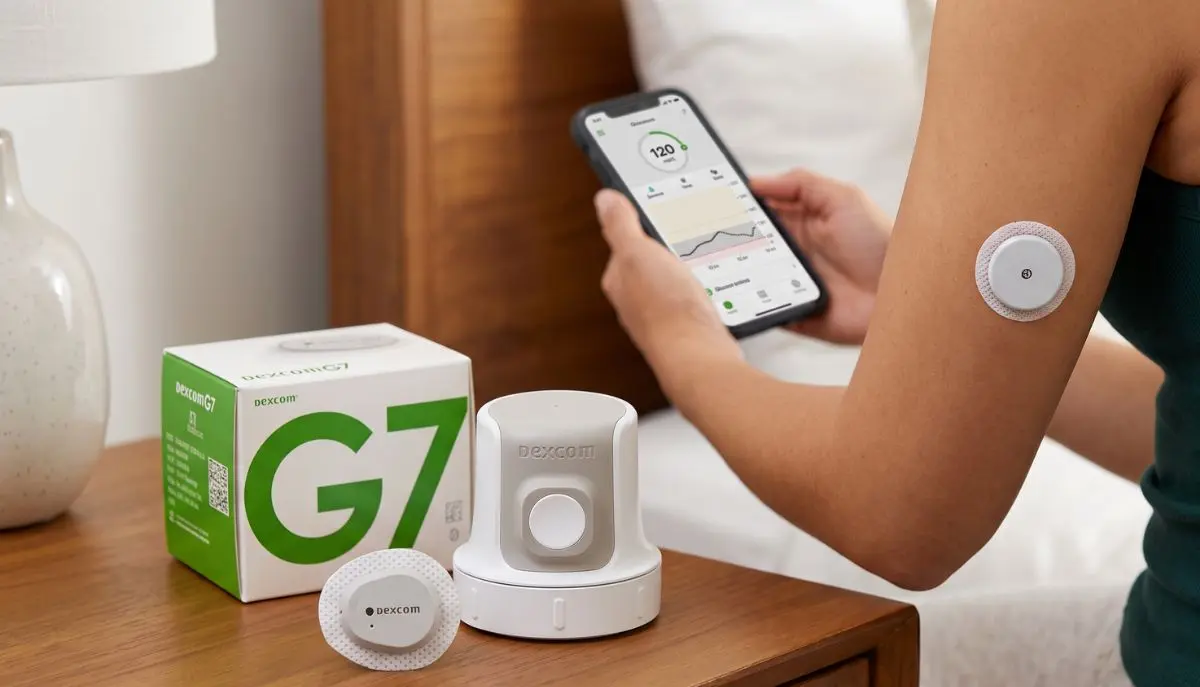
Managing diabetes can involve many daily decisions. Checking glucose, understanding trends, keeping track of medications, planning meals, and staying active can all become part of a person’s routine. Continuous glucose monitoring (CGM) technology has made it possible to follow glucose information throughout the day without relying only on traditional fingerstick testing.
If you are searching for a Dexcom G7 sensor USA, you may be looking for a convenient way to monitor glucose, understand glucose trends, and stay informed about changes between routine checks.
The Dexcom G7 Continuous Glucose Monitoring System is a real-time CGM designed for people with diabetes. The current U.S. Dexcom information states that the G7 is indicated for people age 2 and older with diabetes.
For patients, caregivers, and families, the most important thing is understanding what the sensor does, how long it lasts, where it can be worn, what equipment is needed, and where to obtain genuine supplies.
This guide explains the Dexcom G7 sensor USA in straightforward language and provides practical information to help you understand the product before purchasing or using it.
Medical information note: This article is for general education. Always follow the official Dexcom instructions and the recommendations of your healthcare professional for your individual diabetes care.
What is the Dexcom G7 Sensor?
The Dexcom G7 sensor is a wearable component of the Dexcom G7 continuous glucose monitoring system.
Instead of requiring you to manually check glucose every time you want information, the G7 system continuously collects glucose data and sends information to a compatible display device.
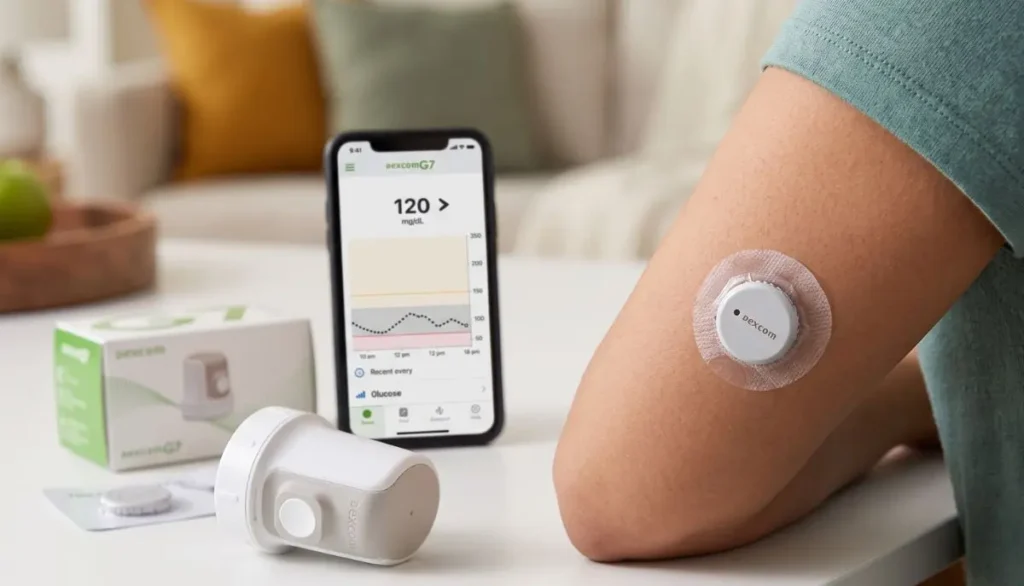
Dexcom describes G7 as a real-time CGM that provides glucose information to a compatible smart device or receiver.
The system can help users see:
- Current glucose information
- Glucose trends
- High and low glucose alerts
- Changes in glucose levels over time
- Information that can support conversations with a healthcare professional
The sensor is worn on the body and communicates wirelessly with a compatible display.
This can make glucose monitoring feel less like a series of separate checks and more like having ongoing information available throughout the day.
Why Are People Searching for a Dexcom G7 Sensor USA?
The search phrase “dexcom g7 sensor USA” can have several meanings.
Someone may be looking for:
- A Dexcom G7 sensor available in the United States
- A U.S. medical supply company carrying Dexcom G7 supplies
- Information about Dexcom G7 sensor availability
- How long the sensor lasts
- Where to insert the sensor
- Whether a receiver is required
- How to replace a sensor
- How to purchase replacement sensors
- Information about prescriptions and insurance
- A reliable source for diabetes supplies
Because CGM products are medical devices, it is important to check the exact product, intended use, compatibility, and current manufacturer instructions before ordering.
For example, Alfa Healthcare Supply Inc. currently lists the Dexcom G7 Sensor among its diabetic supplies and also lists the Dexcom G7 Receiver.
How Does the Dexcom G7 Sensor Work?
The Dexcom G7 sensor measures glucose in the fluid beneath the skin and communicates glucose information to a compatible display device.
The display can be a compatible smartphone running the Dexcom G7 app or an optional Dexcom G7 receiver. Dexcom states that the G7 system requires sensors, the sensor overpatch, and a compatible display device.
This distinction is useful because the sensor and receiver are not the same thing.
The sensor
The sensor is the wearable part placed on the body.
The app
The Dexcom G7 app can provide glucose information on a compatible smartphone.
The receiver
The receiver is a separate handheld display option for people who choose not to rely on a smartphone or who have another reason to use a dedicated receiver.
Understanding these components can make the purchasing process easier.
How Long Does a Dexcom G7 Sensor Last?
One of the most common questions about the Dexcom G7 sensor USA is how frequently it needs to be replaced.
According to Dexcom, the standard Dexcom G7 sensor is indicated for up to 10 days of wear, followed by a 12-hour grace period.
After the grace period, the sensor needs to be replaced to continue receiving glucose readings and alerts.
Dexcom also states that the standard G7 sensor cannot simply be restarted after its session ends.
What does this mean in everyday life?
A user may organize their supplies around their sensor replacement schedule.
For example:
Sensor starts → approximately 10 days of use → 12-hour grace period → replace sensor
Having replacement supplies available before the current sensor expires can help avoid unnecessary interruptions.
Dexcom G7 Sensor vs. Dexcom G7 15 Day
It is important not to confuse the standard Dexcom G7 sensor with the Dexcom G7 15 Day system.
Dexcom currently provides separate information for these products.
The standard Dexcom G7 is indicated for up to 10 days, plus a 12-hour grace period.
The Dexcom G7 15 Day sensor is indicated for up to 15 days, plus a 12-hour grace period, and has different age and use specifications.
Therefore, when searching for a Dexcom G7 sensor USA, pay attention to the exact product name.
Do not assume that every Dexcom G7 listing represents the same sensor version.
Where Is the Dexcom G7 Sensor Placed?
Proper placement is important.
According to current Dexcom instructions, the standard Dexcom G7 sensor can be inserted on the back of the upper arm for people age 2 and older. For children ages 2 through 6, the upper buttocks is also an indicated location.
Dexcom recommends choosing an area that:
- Has sufficient tissue
- Is away from areas likely to be bumped or pressed
- Is away from irritated skin
- Is away from scars
- Is away from tattoos
- Is away from areas where the sensor may be compressed during sleep
- Is at least 3 inches from an insulin infusion or injection site
The exact placement instructions should always come from the current Dexcom product instructions.
Why placement matters
A sensor may be worn for many days, so choosing a comfortable and appropriate site matters.
It is also recommended to change the insertion site with each new sensor so that the skin has an opportunity to recover.
How Do You Apply the Dexcom G7 Sensor?
The Dexcom G7 system uses an applicator designed to simplify sensor insertion.
A general process includes:
- Wash and dry your hands.
- Select an appropriate sensor location.
- Clean the skin according to the manufacturer’s instructions.
- Allow the area to dry.
- Prepare the G7 applicator.
- Position the applicator correctly.
- Insert the sensor according to the Dexcom instructions.
- Apply and secure the overpatch as instructed.
- Pair the sensor with the compatible display device.
- Complete the sensor warm-up period.
Dexcom’s official setup instructions explain that the G7 has a warm-up period of approximately 30 minutes.
Always read the current product instructions before applying a new sensor.
Does the Dexcom G7 Require a Receiver?
No, a separate receiver is not automatically required.
Dexcom states that the G7 system can use a compatible smart device with the Dexcom G7 app, while an optional receiver is also available.
This gives users different display options.
Smartphone option
You may use a compatible smartphone and the Dexcom G7 app.
Receiver option
You may use the Dexcom G7 receiver as a dedicated display device.
Why might someone choose a receiver?
A receiver may be useful for people who:
- Prefer a dedicated medical device
- Do not want to depend entirely on a smartphone
- Have compatibility limitations with their phone
- Want a separate screen for glucose monitoring
Before purchasing a receiver, check the current Dexcom compatibility information and your healthcare professional’s recommendations.
Dexcom G7 Sensor USA: What Should You Check Before Buying?
When purchasing a Dexcom G7 sensor USA, it is worth taking a few minutes to verify the product.
1. Check the exact product name
Make sure the listing specifically identifies the product you need.
Standard Dexcom G7 and Dexcom G7 15 Day are different products.
2. Check whether a prescription is required
Medical-device purchasing requirements can depend on the product, supplier, insurance arrangement, and applicable regulations.
If a prescription is required, make sure it is available before ordering.
3. Check compatibility
If you plan to use the smartphone app, check whether your phone and operating system are supported.
Dexcom recommends checking its current compatibility information for supported smart devices.
4. Check the sensor expiration information
Look at the packaging and expiration information supplied with your product.
5. Purchase from a legitimate medical supply source
Medical supplies should come from a reliable supplier that handles products appropriately.
6. Check what is included
Make sure you understand whether you are purchasing a sensor, receiver, or another component.
This prevents a common mistake: ordering one part of the system while expecting another component to be included.
Is the Dexcom G7 Sensor Reusable?
No.
Dexcom identifies its sensors as single-use, disposable supplies.
Once a sensor reaches the end of its approved wear period, it should not be reused or restarted.
If a sensor fails before the expected end of its life, Dexcom recommends contacting its technical support team. Dexcom has a sensor replacement policy for confirmed product failures.
What If Your Dexcom G7 Sensor Falls Off?
A sensor can sometimes become loose or come off because of:
- Sweat
- Friction from clothing
- Exercise
- Accidental bumps
- Skin preparation
- Adhesive problems
Dexcom recommends using the overpatch supplied with the G7 sensor as instructed. The overpatch is intended to help keep the sensor in place during the sensor session.
If your sensor comes off unexpectedly, do not simply reattach it and assume that it will function normally.
Instead, follow the current Dexcom instructions and contact Dexcom support when appropriate.
Dexcom G7 Sensor Warm-Up Time
The G7 has a relatively short warm-up period.
Dexcom states that the G7 has a 30-minute warm-up time.
During this period, the sensor is establishing communication and preparing to provide readings.
A person starting a new sensor should plan accordingly.
For example, if you know your current sensor is approaching the end of its session, having the replacement sensor ready can make the transition easier.
Understanding Dexcom G7 Alerts
One of the useful parts of a CGM system is the ability to receive alerts.
Dexcom’s G7 system provides alerts for glucose conditions, including high and low glucose situations.
These alerts can be especially useful because glucose levels can change while a person is:
- Sleeping
- Working
- Exercising
- Traveling
- Eating
- Going through a normal daily routine
However, alerts should be understood as part of an overall diabetes management plan.
If an alert appears and you are unsure what it means or what action to take, follow your healthcare professional’s instructions.
Can Dexcom G7 Replace Fingersticks?
The answer depends on the specific clinical situation, instructions, and device use.
Dexcom describes G7 as a real-time CGM designed to provide glucose information without the need for routine scanning.
However, users should always follow the current Dexcom instructions regarding situations where a blood glucose meter or additional testing may be appropriate.
Never ignore symptoms simply because a CGM reading appears normal or because an alert has not appeared.
If your symptoms do not match your CGM reading, follow the manufacturer’s instructions and seek appropriate medical guidance.
Dexcom G7 Sensor USA for Everyday Diabetes Management
For many people, CGM technology is not simply about seeing a glucose number.
The bigger benefit is understanding patterns.
For example, someone may begin to notice that glucose behaves differently:
- After breakfast
- After physical activity
- During the night
- During stressful periods
- After certain meals
- When medication timing changes
This information can give patients and healthcare professionals more context during diabetes-management discussions.
The Dexcom G7 is designed to provide continuous glucose information throughout the day and night.
It does not replace professional medical advice, but it can provide useful information that becomes part of a broader care plan.
Why Genuine Medical Supplies Matter
When purchasing a Dexcom G7 sensor USA, authenticity and proper sourcing deserve attention.
A CGM sensor is a medical device, not a general consumer electronic accessory.
When purchasing, consider:
- Supplier reputation
- Product identification
- Packaging condition
- Expiration information
- Prescription requirements
- Storage and handling
- Return policies
- Customer support
- Insurance considerations
Avoid purchasing products with unclear origins or questionable packaging.
If something about a sensor appears unusual, contact the manufacturer or your medical supply provider before using it.
Buying Dexcom G7 Sensor in the USA
Alfa Healthcare Supply Inc. provides diabetic supplies and lists the Dexcom G7 Sensor and Dexcom G7 Receiver among its diabetes-related products.
View Alfa Healthcare Supply’s Diabetic Supplies
For someone searching for dexcom g7 sensor USA, Alfa Healthcare Supply Inc. can be one option to consider when looking for medical supply support.
Before placing an order, customers should confirm:
- The exact Dexcom product needed
- Current product availability
- Prescription requirements
- Insurance or payment information
- Delivery details
- Compatibility requirements
Product availability and requirements can change, so verify the current information before ordering.
Dexcom G7 Sensor USA and Insurance
Insurance coverage for CGM supplies can vary significantly.
Coverage may depend on factors such as:
- Insurance plan
- Diagnosis
- Medical necessity
- Prescriber documentation
- Eligibility requirements
- Durable medical equipment benefits
- Pharmacy benefits
- Individual plan policies
Do not assume that every insurance plan covers the Dexcom G7 in the same way.
If you are using insurance, contact your insurance provider or medical supply company before ordering to understand your current coverage.
How to Store Dexcom G7 Sensors
Always follow the manufacturer’s storage instructions printed on the product packaging and in the current instructions for use.
Do not use a sensor if:
- Packaging is damaged
- The product appears compromised
- The sensor is expired
- The product has been stored incorrectly
- You have concerns about its condition
Proper storage is part of maintaining the quality of medical supplies.
If you have questions about storage requirements, contact Dexcom or your healthcare supply provider.
What Makes a Good Dexcom G7 Sensor Buying Experience?
Finding a sensor is only one part of the process.
A good medical supply experience should also make it easier to understand what you are buying.
Look for a supplier that provides clear information about:
Product details
You should be able to identify the exact product.
Prescription requirements
The supplier should clearly explain whether a prescription is needed.
Ordering
The ordering process should be straightforward.
Delivery
Understand where the product will be shipped and the expected delivery process.
Support
It should be clear who to contact if you have questions about your order.
Product condition
Medical supplies should arrive appropriately packaged and in acceptable condition.
These details can make a significant difference when you depend on regular supplies.
Common Mistakes to Avoid When Buying Dexcom G7 Sensors
Mistake 1: Buying the wrong product
Do not assume every Dexcom G7 listing is identical.
Check whether you need the standard G7 or G7 15 Day product.
Mistake 2: Forgetting about compatibility
If using the app, check your smartphone compatibility before purchasing.
Mistake 3: Waiting until the last sensor expires
Keep your replacement schedule in mind.
Mistake 4: Ignoring the expiration date
Always check the product packaging.
Mistake 5: Buying from an uncertain source
Choose a legitimate medical supply provider.
Mistake 6: Ignoring manufacturer instructions
CGM systems should be used according to the current manufacturer’s instructions.
Dexcom G7 Sensor USA: A Simple Replacement Routine
A simple routine can make sensor changes easier.
Before the current sensor expires
Check that your replacement sensor is available.
Prepare the new sensor
Read the current instructions and make sure everything needed is ready.
Choose a new site
Use an approved location and avoid irritated or unsuitable skin.
Apply the sensor
Follow the manufacturer’s insertion instructions carefully.
Apply the overpatch
Use the included overpatch as instructed.
Pair the sensor
Connect it with the compatible display device.
Complete warm-up
Allow the approximately 30-minute warm-up period.
Continue monitoring
Once the sensor is active, use the available glucose information and alerts according to your care plan.
This simple routine can help make sensor replacement feel less stressful.
Final Thoughts: Finding the Right Dexcom G7 Sensor USA
Searching for a Dexcom G7 sensor USA should be about more than finding a product listing.
It is important to understand the exact sensor version, wear duration, insertion location, compatible display options, prescription requirements, and replacement schedule.
The standard Dexcom G7 is designed to provide continuous glucose information for up to 10 days, with a 12-hour grace period. It can communicate with a compatible smartphone or an optional receiver, giving users flexibility in how they view their glucose information.
For people who depend on CGM supplies as part of their diabetes routine, planning ahead can make sensor replacement much easier.
If you are looking for Dexcom G7 supplies in the USA, Alfa Healthcare Supply Inc. offers diabetic supplies and currently lists the Dexcom G7 Sensor and Dexcom G7 Receiver.
The most important step is to choose the correct product for your prescribed or recommended CGM system and follow the latest manufacturer’s instructions and guidance from your healthcare professional.
Frequently Asked Questions About Dexcom G7 Sensor USA
How long does a Dexcom G7 sensor last?
The standard Dexcom G7 sensor is indicated for up to 10 days, followed by a 12-hour grace period.
Can I restart a Dexcom G7 sensor?
No. Dexcom states that the G7 sensor cannot be restarted after its sensor session ends.
Where can I wear the Dexcom G7 sensor?
For the standard G7, Dexcom indicates the back of the upper arm for people age 2 and older. For children ages 2–6, the upper buttocks is also an indicated location.
Does Dexcom G7 require a receiver?
No. A compatible smartphone can be used with the Dexcom G7 app. A receiver is an optional display device.
How long is the Dexcom G7 warm-up?
Dexcom states that the G7 has a 30-minute warm-up.
Is Dexcom G7 reusable?
No. Dexcom identifies G7 sensors as single-use, disposable supplies.
What should I do if my sensor fails early?
If a sensor fails before its expected life, Dexcom recommends contacting its technical support team. Confirmed product failures may qualify for replacement under Dexcom’s sensor replacement policy.
Can I buy Dexcom G7 sensors in the USA?
Yes, Dexcom G7 sensors are available through U.S. medical supply channels, subject to applicable product and prescription requirements. Alfa Healthcare Supply Inc. currently lists the Dexcom G7 Sensor among its diabetic supplies.
Is the Dexcom G7 approved for children?
The FDA’s current information identifies the Dexcom G7 CGM System as indicated for management of diabetes in people 2 years and older.