


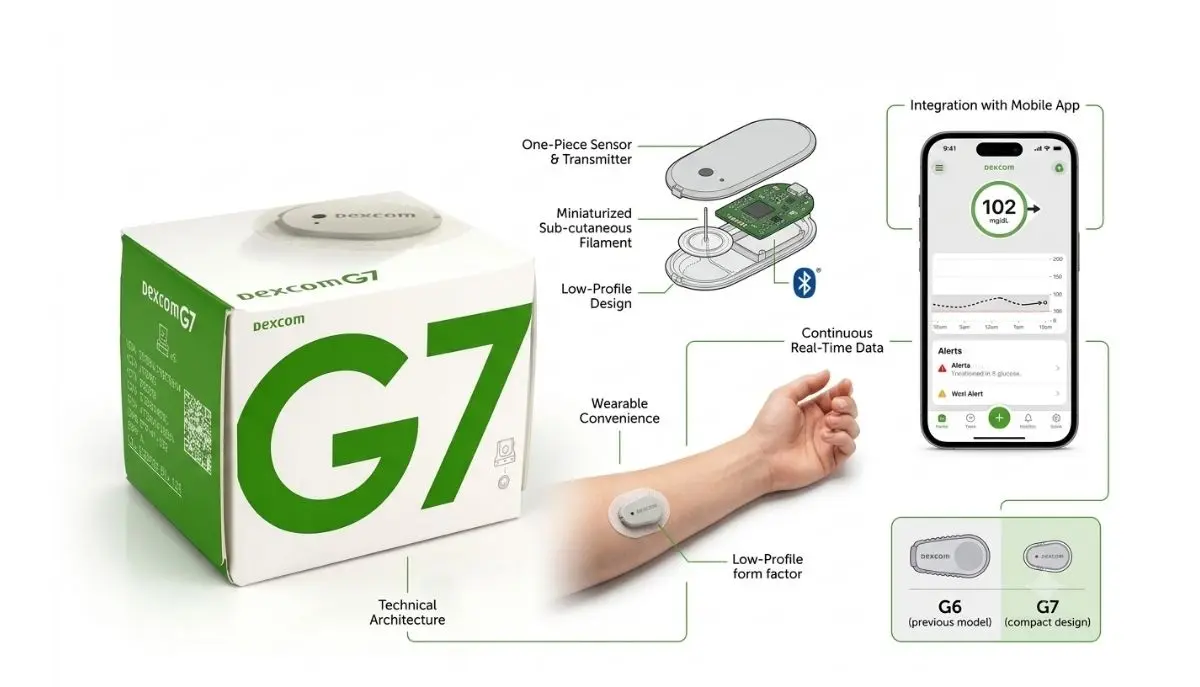
If you have diabetes and use a continuous glucose monitor (CGM), you know how important your sensor is. A Dexcom G7 sensor helps you see your glucose levels throughout the day and can provide alerts when your glucose is getting too high or too low.
But what happens when you find a Dexcom G7 sensor in your supplies and notice that the expiration date has already passed?
One common question is: can i use an expired Dexcom G7 sensor?
The safest answer is no. You should not intentionally use a Dexcom G7 sensor after the expiration date printed on its packaging. An expiration date is different from the normal 10-day sensor wear period. The package expiration date tells you how long the unopened product is intended to remain within its labeled shelf life. Once that date has passed, the manufacturer no longer recommends using it.
Dexcom also states that its sensors are single-use, disposable products and provides a defined sensor life for the G7. The standard Dexcom G7 sensor is designed for up to 10 days of use, followed by a 12-hour grace period.
This article explains the difference between an expired sensor and an expired sensor session, what you should do if you accidentally used an expired sensor, and how to avoid running out of sensors.
Important: This article is for general educational information and is not a substitute for medical advice. If your glucose readings do not match how you feel, use a blood glucose meter as directed by your healthcare professional and seek appropriate medical help.
The Dexcom G7 is a continuous glucose monitoring system designed to provide glucose information without requiring you to perform a traditional fingerstick every time you want to check your glucose.
The system uses a small wearable sensor that measures glucose and sends information to a compatible display device, such as a compatible smartphone or receiver. Dexcom describes the G7 as an all-in-one sensor and transmitter system.
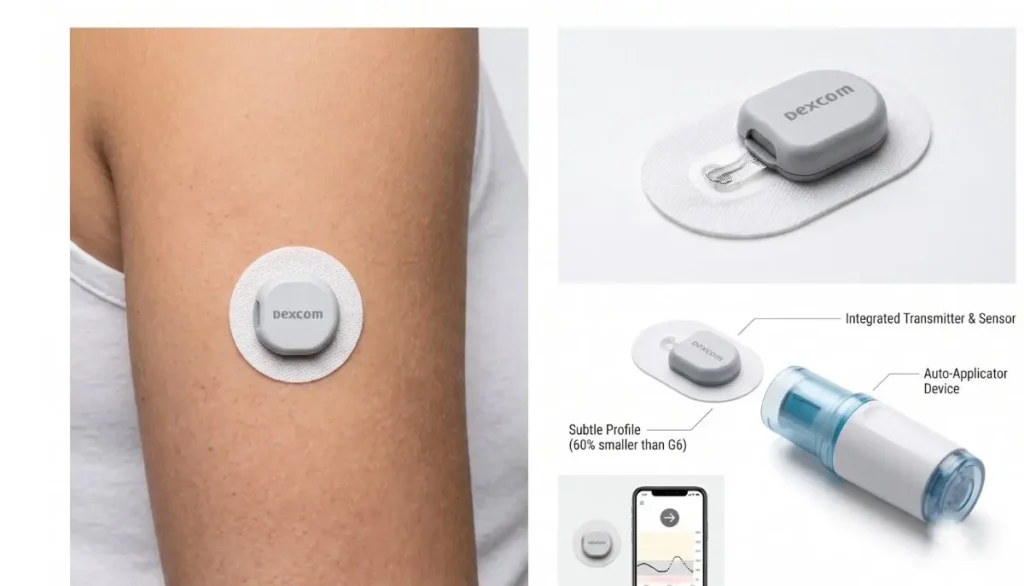
For many people, a CGM can make daily diabetes management easier because glucose information is available regularly rather than only when a person performs a blood glucose test.
The Dexcom G7 is designed for a defined period of use. The standard G7 sensor lasts up to 10 days, followed by a 12-hour grace period.
That does not mean a sensor can be used indefinitely.
There are two different meanings of the word “expired” that are important to understand:
These situations are not the same.
If you are asking about an unopened Dexcom G7 sensor whose package expiration date has passed, the safest answer is no.
Do not insert an expired sensor simply because the package looks unopened or because it appears to be in good condition.
The expiration date exists because the manufacturer establishes a shelf life for the product. After that date, the manufacturer cannot assure the same performance expected during the labeled shelf life.
This is particularly important with a glucose-monitoring device because inaccurate glucose information could affect diabetes management decisions.
Dexcom’s safety information emphasizes that using its CGM system incorrectly can potentially result in missing high or low glucose events or making a treatment decision that could cause injury. Dexcom also advises using a blood glucose meter when CGM readings do not match symptoms or expectations.
An expired sensor may not perform as intended.
Possible concerns include:
Because of these concerns, using a fresh, unexpired sensor is the better choice.
This is one of the most important points to understand.
A Dexcom G7 sensor has a package expiration date, but once a new sensor is properly started, it also has a defined sensor session life.
These are two separate things.
The package expiration date applies to the unused sensor.
For example, imagine that a sensor package says it expires in June 2026. If you find that sensor in July 2026, it is already past its labeled expiration date.
You should not intentionally insert it.
A new, valid Dexcom G7 sensor has a sensor session of up to 10 days, followed by a 12-hour grace period. Dexcom says the sensor continues to work during that grace period and alerts the user as the session approaches its end.
The grace period is designed to give you additional time to replace the sensor at a convenient time.
It is not an additional shelf-life extension for an expired unopened sensor.
That distinction is extremely important.
The standard Dexcom G7 sensor is indicated for use for up to 10 days, with a 12-hour grace period at the end of the sensor session.
During the grace period, the sensor continues to provide information in the same way it did during the sensor session, according to Dexcom.
After the grace period ends, you need to replace the sensor to continue receiving glucose readings and alerts from the sensor. Dexcom specifically states that G7 sensors cannot be restarted after the session and grace period have ended.
So, if someone says:
“My Dexcom G7 is expired. Can I keep wearing it?”
The answer depends on what they mean.
If they mean the 10-day sensor session has ended, Dexcom provides a 12-hour grace period.
If they mean the expiration date printed on an unused sensor package has passed, that is different, and the sensor should not be used.
Medical devices have expiration dates for a reason.
A manufacturer evaluates how its product performs during its expected shelf life when stored according to the required conditions.
Over time, different components can potentially change. Depending on the product, these may include:
The expiration date provides a defined limit for the manufacturer’s labeled product shelf life.
This is one reason it is better not to think of an expiration date as simply a suggestion.
For a device that provides information used in diabetes management, reliability matters.
It is possible for an expired medical device to appear to function, but that does not mean it is appropriate or reliable to use.
A sensor might start and display readings even though its package expiration date has passed.
That can make the situation confusing.
You might think:
“If it starts, it must be okay.”
But that is not a safe assumption.
The important question is not simply whether the sensor starts. The question is whether the sensor is being used within the manufacturer’s intended and labeled conditions.
For diabetes management, reliable information is especially important.
Dexcom warns that if G7 readings or alerts do not match your symptoms or expectations, you should use a blood glucose meter to make treatment decisions.
Don’t panic.
If you accidentally inserted a sensor and then realized that its expiration date had passed, the best approach is to stop and evaluate the situation rather than assuming that everything is fine.
Look at the sensor packaging and confirm the date.
Make sure you are looking at the product expiration date, not the date when your previous sensor session ended.
If the sensor is already operating, pay attention to whether the readings appear reasonable.
However, don’t assume that normal-looking numbers prove that an expired sensor is reliable.
If your CGM reading does not match how you feel, Dexcom recommends using a blood glucose meter for treatment decisions.
For example, if your CGM shows a low glucose level but you feel completely different, or if you have symptoms that do not match the displayed reading, follow your healthcare professional’s instructions for checking your blood glucose.
If you have questions about an expired sensor, sensor failure, or possible replacement, contacting Dexcom Product Support can help you determine the appropriate next step.
Dexcom states that it may replace confirmed product failures during the sensor’s intended lifetime and also offers courtesy replacements in some circumstances.
If you depend on CGM readings for important treatment decisions and your sensor is unavailable or unreliable, ask your healthcare professional what monitoring method you should use temporarily.
This is different from using an expired sensor from your supply.
A properly started Dexcom G7 sensor has a defined sensor session.
According to Dexcom, the standard G7 provides up to 10 days of wear followed by a 12-hour grace period. The device provides alerts as the sensor session or grace period approaches its end.
The grace period is useful because you may not always be able to replace a sensor at the exact moment the 10-day session ends.
For example, your sensor might reach the end of its normal session while you are:
The grace period gives you additional time.
However, once that grace period has ended, you should replace the sensor.
Dexcom states that the G7 sensor cannot be restarted after the 10-day period and grace period.
No.
Dexcom specifically states that no restarts are allowed for the G7 sensor after the 10-day sensor period. After the grace period ends, the sensor must be replaced to continue receiving glucose readings or alerts.
This means you should not try to find ways to restart a finished G7 sensor.
The safest approach is to use a new, unexpired sensor according to the manufacturer’s instructions.
A Dexcom G7 sensor is designed for a defined period of use.
Once the sensor session and grace period are over, you should replace it.
Continuing to rely on a finished sensor could leave you without reliable CGM information.
That matters because CGM information may be used to help understand glucose trends and alerts.
If the CGM stops providing readings, use the backup glucose-monitoring method recommended by your healthcare professional until you can start a valid replacement sensor.
One of the biggest benefits of a CGM is that it gives you information about glucose levels and trends throughout the day.
But the information is useful only when the system is working correctly.
For someone living with diabetes, inaccurate information can create unnecessary worry or potentially lead to inappropriate decisions.
For example, a person could:
Dexcom’s safety information specifically warns that improper use can contribute to missed high or low glucose events or treatment decisions that may result in injury.
That is why using an unexpired sensor according to the manufacturer’s instructions is so important.
Before starting a new sensor, make it a habit to perform a quick check.
Look at the date printed on the package.
If the date has passed, do not use the sensor.
Make sure the package is not damaged or compromised.
If something appears unusual about the packaging, don’t use the sensor until you have received appropriate guidance.
Look for obvious damage.
If the sensor or applicator appears damaged, contact the appropriate product support team.
Make sure you have:
Dexcom provides current G7 user guides and product resources. Following the instructions supplied with your particular system is important because product instructions can change over time.
Proper storage is another important part of protecting your supplies.
Do not leave medical devices in extreme temperatures or conditions that are outside the manufacturer’s storage recommendations.
Keep your sensors in their original packaging until they are ready to be used, and follow the storage instructions provided with your product.
Proper storage helps protect the sensor during its labeled shelf life.
If you are unsure whether a sensor has been exposed to damaging conditions, contact the manufacturer or your healthcare professional for guidance rather than guessing.
This is a common question.
Even if a sensor expired only one day ago, the safest choice is not to use it.
The expiration date establishes the end of the manufacturer’s labeled shelf life. You should not assume that a sensor is automatically acceptable simply because it is only slightly past the date.
This is especially important for CGM sensors because the information they provide may influence diabetes management.
Instead, use an unexpired sensor and contact the manufacturer or supplier if you have questions about replacement options.
The answer remains no.
A sensor that expired last month is outside its labeled expiration date.
It may look perfectly normal, but appearance alone cannot establish that it will provide the expected performance.
If you have several expired sensors, do not insert them simply because you do not want to waste them.
Ask Dexcom or your healthcare professional about appropriate disposal and replacement options.
Running out of sensors can be stressful, especially if you rely on CGM information every day.
The best solution is planning ahead.
Instead of waiting until your final sensor is almost finished, check your remaining supply regularly.
Refill timing depends on your prescription, insurance, supplier, and location.
Try to arrange your next supply before your current supply is exhausted.
A blood glucose meter can be an important backup when CGM information is unavailable or does not match your symptoms.
Ask your healthcare professional which meter and testing schedule are appropriate for you.
Store sensors in an appropriate location where you can easily see expiration dates.
A simple first-expiring, first-used system can help reduce the chance of discovering an expired sensor at the last minute.
You should be especially careful when considering CGM use for a child.
Dexcom G7 indications and approved wear locations depend on age and the particular product. For the standard G7, Dexcom currently states that the sensor may be worn on the back of the upper arm for ages 2 years and older, with the upper buttocks listed for children ages 2–6.
If you have an expired sensor intended for a child, do not use it simply because you have no other sensor available.
Talk with the child’s healthcare professional and follow the manufacturer’s instructions.
Technology can sometimes make medical-device questions confusing.
If an app or receiver appears to recognize a sensor, that does not necessarily mean the sensor is within its labeled shelf life.
The software’s ability to communicate with a device should not be treated as confirmation that an expired product is appropriate for use.
Always check the physical product and follow the current manufacturer’s instructions.
It is possible that a sensor outside its labeled expiration period may not perform as expected.
The important point is that you should not rely on an expired sensor to provide the same performance expected from an unexpired product.
Dexcom emphasizes the importance of taking action when CGM readings do not match symptoms or expectations. In that situation, Dexcom recommends using a blood glucose meter for diabetes treatment decisions.
If you ever feel that your CGM reading is wrong, don’t ignore your symptoms just because the number appears on your phone or receiver.
Your symptoms matter.
This is one of the most important safety points for anyone using a CGM.
Suppose your Dexcom shows a glucose number that seems unusual, but you feel symptoms that suggest something different.
Don’t simply assume that the CGM number is correct.
Dexcom’s safety information says that when glucose readings or alerts do not match symptoms or expectations, users should use a fingerstick blood glucose value from a blood glucose meter to make treatment decisions.
Follow your healthcare professional’s instructions for what to do with the meter result.
If you have severe symptoms or believe you may be experiencing a serious glucose emergency, seek appropriate medical attention.
Finding the right diabetes supplies can make everyday care feel more manageable.
Alfa Healthcare Supply Inc. provides medical supply products and DME supplies for patients and caregivers.
The company serves customers from its Floral Park location and provides medical supplies to communities across New York. Alfa Healthcare Supply Inc. focuses on helping customers find appropriate medical equipment and supplies for their needs.
If you are looking for diabetes-related supplies, it is important to make sure that the product you receive is appropriate for your needs and that you check expiration dates before use.
When purchasing or receiving CGM supplies, consider checking:
For Dexcom products, always follow the manufacturer’s instructions and use the appropriate product for your particular Dexcom system.
So, can I use an expired Dexcom G7 sensor?
It is best not to.
If the expiration date printed on the unopened sensor package has passed, do not intentionally insert or rely on that sensor. The expiration date is different from the G7’s normal 10-day wear period and 12-hour grace period.
The standard Dexcom G7 sensor is designed for up to 10 days of use, followed by a 12-hour grace period. Once the grace period ends, Dexcom says the sensor must be replaced and cannot be restarted.
If you accidentally use an expired sensor, don’t assume that a displayed number is automatically reliable. Pay attention to your symptoms, follow your healthcare professional’s instructions, and use a blood glucose meter when CGM readings do not match your symptoms or expectations.
A few minutes spent checking the expiration date before insertion can help prevent an avoidable problem later.
For people managing diabetes, reliable information matters. When in doubt, choose an unexpired sensor and ask your healthcare professional or Dexcom Support for guidance.
No. You should not intentionally use an unopened Dexcom G7 sensor after the expiration date printed on its packaging. Use a current, unexpired sensor according to Dexcom’s instructions.
Yes. The standard Dexcom G7 has a 12-hour grace period after its 10-day sensor session.
No. The 12-hour grace period applies to an active sensor session. It does not mean that an unopened sensor can be used after its package expiration date.
No. Dexcom states that G7 sensors cannot be restarted after the sensor session and grace period have ended.
A sensor may appear to communicate with a device, but that does not mean it should be used after its expiration date. Do not rely on an expired sensor for diabetes management.
Check the expiration date, monitor the situation carefully, and contact Dexcom Support for guidance. If your CGM readings do not match your symptoms, use a blood glucose meter according to your healthcare professional’s instructions.
Proper storage does not extend the labeled expiration date. If the package expiration date has passed, use a new sensor instead.
The standard Dexcom G7 sensor is designed for up to 10 days, followed by a 12-hour grace period.
You should not rely on the sensor beyond its approved session and grace period. Replace it with a new sensor.
You can use Dexcom’s official product guides and support resources, or speak with your healthcare professional. Dexcom provides G7 user guides, receiver guides, and other educational resources.
This article is provided for general educational purposes and should not replace professional medical advice, diagnosis, or treatment. Dexcom product specifications, indications, compatibility, and instructions can change. Always review the current manufacturer’s instructions for your specific product. If you experience symptoms of severe low or high blood glucose or another medical emergency, seek immediate medical attention.