


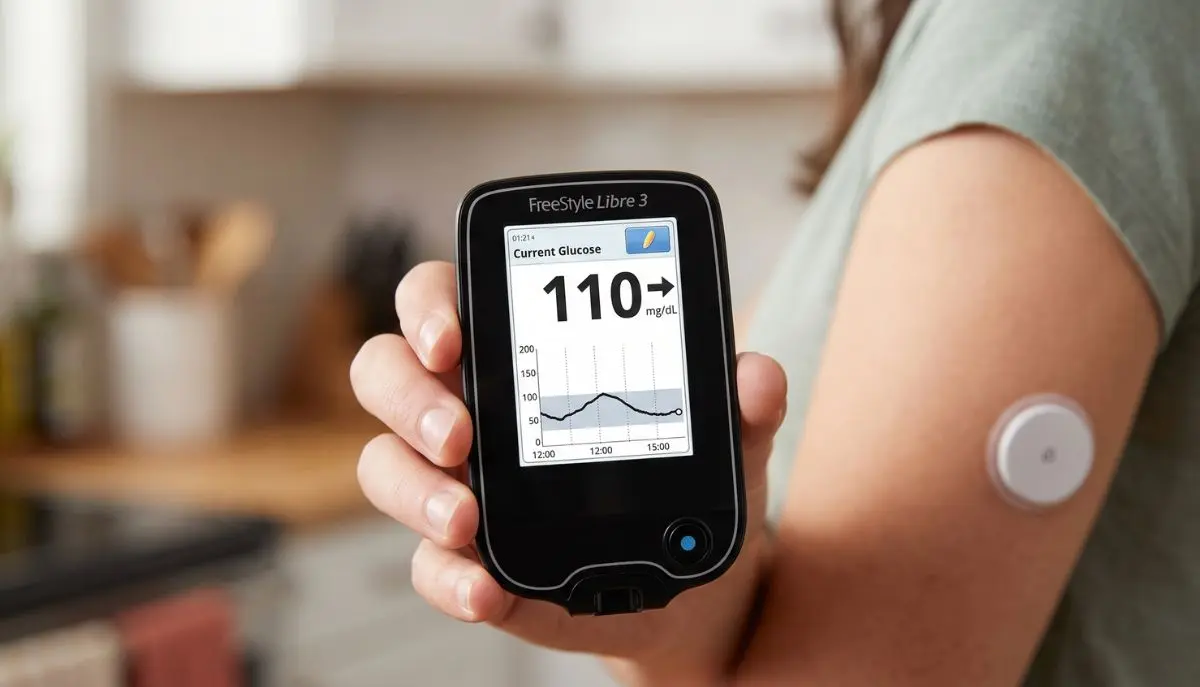
How to Use the FreeStyle Libre 3 Reader:
If you are using a continuous glucose monitoring (CGM) system for the first time, learning how to use a new reader can feel a little confusing. The good news is that the FreeStyle Libre 3 Reader is designed to make checking glucose simple and convenient.
This guide from Alfa Healthcare Supply Inc. explains how to use the FreeStyle Libre 3 Reader in easy-to-understand language, from preparing and starting a sensor to checking glucose readings, understanding trend information, reviewing your history, and replacing the sensor.
Important: The FreeStyle Libre system is a medical device. Always follow the instructions supplied with your specific sensor and reader, and follow your healthcare professional’s advice for treatment decisions. Product instructions can vary by country and sensor version.
What Is the FreeStyle Libre 3 Reader?
The FreeStyle Libre 3 Reader is a handheld device designed to work with compatible FreeStyle Libre 3 sensors. It allows you to view glucose information from your sensor without needing to rely on a smartphone.
Abbott’s support materials provide a dedicated FreeStyle Libre 3 Reader quick-start guide, quick-reference guide, and user manual.
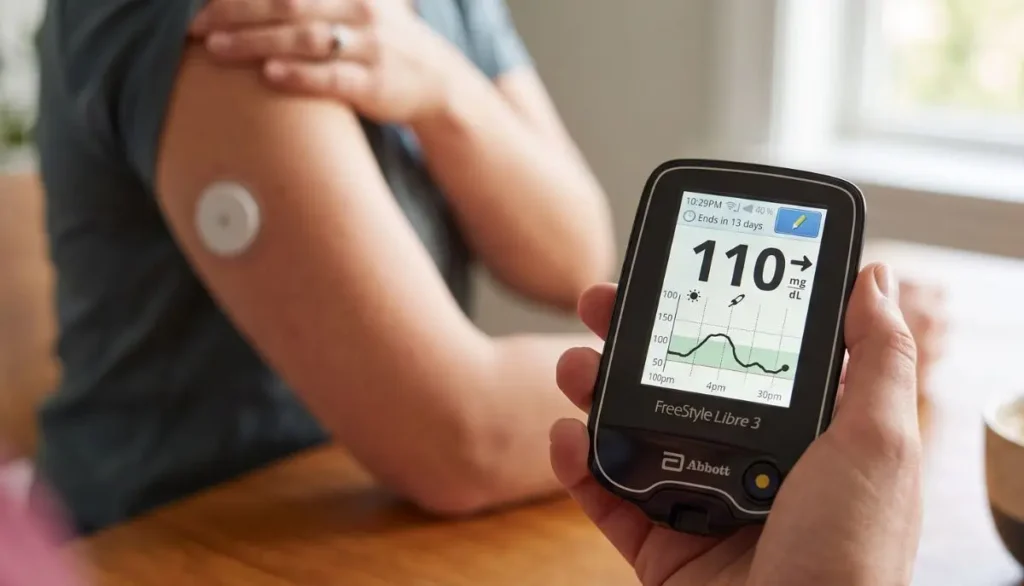
The sensor is worn on the back of the upper arm and collects glucose information. Depending on the system and market, the reader is used to activate the sensor and access glucose information.
One important point is that the reader and app should not be assumed to work interchangeably once a sensor has been started. Abbott’s reader guidance states that the FreeStyle Libre 3 Reader cannot be used simultaneously with the FreeStyle Libre 3 app for the same sensor.
How to Use the FreeStyle Libre 3 Reader
The basic process can be remembered as:
Prepare → Apply → Start → Wait → Check → Review
Let’s walk through each step.
Step 1: Prepare Your FreeStyle Libre 3 Sensor
Before you start, have your sensor, applicator, reader, and the other supplies recommended in your sensor instructions ready.
Choose the appropriate sensor application area.
Abbott’s instructions identify the back of the upper arm as the sensor application site. The skin should be clean and dry before application.
Clean the skin
A simple preparation routine is:
- Wash the selected area with plain soap and water.
- Dry the skin completely.
- Clean the area with an alcohol wipe.
- Allow the skin to air dry.
- Avoid applying the sensor to wet skin.
Clean, dry skin can help the sensor adhesive stay properly attached.
Step 2: Apply the FreeStyle Libre 3 Sensor
Follow the instructions supplied with your specific sensor applicator.
Generally, the applicator is positioned over the prepared area on the back of the upper arm and pressed firmly according to the manufacturer’s instructions.
After application, gently press around the edge of the sensor to help secure it.
Abbott’s instructions emphasize following the sensor-specific application procedure and allowing the sensor to properly adhere before beginning use.
A helpful everyday tip
Try not to rush this step.
If you are applying a new sensor before work, school, travel, or bedtime, give yourself a few extra minutes to properly clean and dry the skin. A little preparation can make the rest of the process easier.
Step 3: Turn On the FreeStyle Libre 3 Reader
Once the sensor has been applied, turn on the reader.
Press the Home button on the FreeStyle Libre 3 Reader.
If you are using the reader for the first time, follow the setup instructions shown on the screen.
Abbott’s professional training material gives the basic sequence as:
Press Home → Touch Start New Sensor → Hold the reader near the sensor.
Step 4: Start a New Sensor
On the reader screen, select:
Start New Sensor
The reader will instruct you to bring it near the sensor.
Hold the reader close to the sensor and move it slowly if necessary until the sensor is detected.
Abbott’s guide states that the reader should be held near the sensor to start it.
When the sensor has been successfully activated, the reader may provide an audible or vibration confirmation if those functions are enabled.
Does the reader need to touch the sensor?
No.
The reader is held close to the sensor. Abbott’s practical guide specifies keeping the reader within approximately 4 cm of the sensor during activation.
Step 5: Wait for the Sensor Warm-Up Period
After activation, the sensor does not provide usable glucose information immediately.
The FreeStyle Libre 3 system requires a 60-minute warm-up period before the sensor can be used to check glucose.
This is normal.
You do not need to repeatedly scan the sensor during the warm-up period.
Think of this first hour as the sensor’s preparation time.
Step 6: Check Your Glucose With the Reader
Once the warm-up period is complete, you can use the reader to view your glucose information.
The reader provides information that can help you see:
- Your current glucose reading
- Glucose trends
- Recent glucose information
- Historical glucose information available on the device
- Relevant system notifications or alarms, depending on the specific system and settings
The exact screens and available functions can vary depending on the sensor version, reader software, and country.
Understanding the Glucose Trend
One useful part of a CGM system is that the number alone is not the entire story.
A glucose reading can be accompanied by a trend arrow, which provides information about the direction glucose is moving.
For example, the trend information can indicate that glucose is:
- Moving upward
- Moving downward
- Remaining relatively steady
This can give you more context than looking at a single glucose number.
However, do not make medication or insulin changes simply because you see a trend arrow unless your healthcare professional has given you a plan for using CGM information to make treatment decisions.
How Often Should You Check the Sensor?
Follow the instructions for your particular FreeStyle Libre system.
For the FreeStyle Libre 3 Sensor, Abbott’s safety information says the system uses available glucose data and recommends scanning the sensor at least once every 8 hours for the most accurate performance.
Your healthcare professional may give you additional instructions based on your individual diabetes management plan.
How to Review Your Glucose History
The FreeStyle Libre 3 Reader is more than a device for looking at your current glucose number.
You can also use it to review previously recorded glucose information.
Looking at historical information can help you and your healthcare professional recognize patterns, such as changes around:
- Meals
- Physical activity
- Sleep
- Medication
- Daily routines
Rather than focusing on one isolated number, reviewing trends over time can provide a broader picture of glucose management.
Abbott explains that Libre systems can provide glucose information and trend information that help users understand how glucose changes throughout the day.
Can You Use the FreeStyle Libre 3 Reader Instead of a Smartphone?
Yes, where the reader is compatible with the sensor and system being used.
One reason some people prefer a dedicated reader is convenience. You may not want to depend on a smartphone every time you need to check your glucose.
A handheld reader can also be useful for someone who:
- Does not regularly use a smartphone
- Prefers a dedicated medical device
- Wants a separate device for glucose monitoring
- Finds a reader easier to understand
However, always confirm that your particular sensor is compatible with your reader before starting it.
Important: Reader vs. FreeStyle Libre App
This is one of the most important things to understand before starting a new sensor.
Do not automatically assume that you can start the same sensor with the reader and then switch freely between the reader and smartphone app.
Abbott’s FreeStyle Libre 3 reader guidance states that the reader cannot be used simultaneously with the FreeStyle Libre 3 app.
The device you use to start the sensor matters.
Before starting a new sensor, decide which compatible device you intend to use and follow the instructions for that system.
If you are unsure whether your reader, smartphone, and sensor are compatible, check Abbott’s current compatibility information or speak with your healthcare professional.
What Happens When the Sensor Reaches the End of Its Wear Period?
Sensors are designed for a specific wear period.
For the FreeStyle Libre 3 Sensor, Abbott’s current safety information specifies up to 14 days of wear.
At the end of the wear period, the sensor stops collecting glucose data and needs to be removed.
Abbott explains that the reader can notify users as the sensor approaches the end of its wear period.
Do not attempt to reuse a sensor.
Abbott’s safety information states that the sensor and applicator are designed for single use.
How to Remove the FreeStyle Libre 3 Sensor
When the sensor has reached the end of its approved wear period, remove it carefully.
A basic approach is:
- Find the adhesive edge.
- Gently lift the edge.
- Slowly peel the sensor away from the skin.
- Dispose of the used sensor appropriately.
- Follow the instructions for applying a new sensor if you are continuing CGM use.
Abbott recommends slowly peeling the adhesive from the skin when removing a sensor.
If the adhesive is difficult to remove, Abbott notes that a soft moisturizer may help with removal.
Common Questions About Using the FreeStyle Libre 3 Reader
Do I need to scan the sensor every time I want a reading?
Follow the instructions for the specific FreeStyle Libre 3 configuration you are using.
The reader is used to access glucose information from the compatible sensor. Abbott’s materials distinguish the sensor activation scan from ongoing glucose monitoring.
How long does a new FreeStyle Libre 3 Sensor take to start?
The sensor has a 60-minute warm-up period after activation before you can use it to check glucose.
Where should I place the FreeStyle Libre 3 Sensor?
Abbott’s instructions specify the back of the upper arm for sensor application.
Always follow the application instructions supplied with your particular sensor.
Can I shower while wearing the sensor?
The applicable FreeStyle Libre system is designed for normal activities such as bathing, swimming, and exercise, subject to the specific sensor’s labeling and instructions.
Follow the water-exposure limitations in your sensor’s user manual.
What if my sensor becomes loose?
If the sensor starts to loosen, pay attention to the manufacturer’s instructions.
Abbott’s safety information notes that intense exercise, sweat, and movement can contribute to sensor loosening.
Do not attempt to reinsert a sensor that has come out of the skin.
Can I reuse a FreeStyle Libre 3 Sensor?
No.
The sensor is designed for single use. Abbott specifically states that FreeStyle Libre 3 Sensors should not be reused.
What if the reader does not detect my sensor?
First, make sure you are following the activation instructions for your specific sensor.
You can try holding the reader close to the sensor and moving it slowly to help establish communication. Abbott’s reader instructions describe holding the reader near the sensor during activation.
If the problem continues, consult the manufacturer’s support information or your healthcare professional.
FreeStyle Libre 3 Reader Troubleshooting Tips
Sometimes the issue is simple.
If the sensor is not detected
Check:
- The sensor has been properly applied.
- You selected Start New Sensor.
- The reader is close enough to the sensor.
- You are using a compatible reader and sensor.
- You are following the correct activation process.
If the sensor is still warming up
Wait until the full warm-up period has finished.
For the FreeStyle Libre 3 system, this is approximately 60 minutes.
If the sensor becomes loose
Do not try to push the sensor back into the skin.
Follow Abbott’s instructions for a sensor that has loosened or fallen off.
If the glucose reading does not match how you feel
Pay attention to Abbott’s safety instructions and your healthcare professional’s guidance. In situations where a sensor reading does not seem consistent with symptoms, confirmatory blood glucose testing may be appropriate according to your system’s labeling and your healthcare professional’s instructions.
Important Safety Information
A CGM can be a helpful tool, but it should not replace appropriate medical care.
For the FreeStyle Libre 3 Sensor, Abbott’s safety information includes several important considerations, including sensor wear duration, skin reactions, sensor loosening, and factors that may affect readings.
For example, Abbott states that some people may experience sensitivity to the sensor adhesive. If significant irritation develops around or under the sensor, the sensor should be removed and use should be stopped while the person contacts a healthcare professional before continuing.
Also, certain substances or medical situations can affect sensor readings. Follow the current labeling for your specific sensor rather than relying on general online advice.
Never use an online article as a substitute for your healthcare professional’s instructions about insulin, medication, or diabetes treatment.
Tips for a Better FreeStyle Libre 3 Reader Experience
Once you understand the basic process, using the reader can become part of your normal daily routine.
1. Keep the reader somewhere easy to find
Choose one regular location at home so you are not searching for it when you need it.
2. Keep the device charged
A reader with a low battery may be inconvenient when you need to check your glucose.
3. Keep your sensor supplies together
Store new sensors and related supplies according to their package instructions.
4. Check your sensor before exercise
Make sure it is firmly attached before activities that involve significant movement or sweating.
5. Pay attention to trends
Do not look only at the glucose number. Trend information can add useful context.
6. Keep your healthcare team involved
Bring relevant glucose information to appointments when your healthcare professional asks you to do so.
Why the FreeStyle Libre 3 Reader Can Be Helpful
For many people, the biggest advantage of a dedicated reader is simplicity.
You do not necessarily need to unlock a phone, open an application, or navigate through several menus just to access glucose information. A dedicated reader gives you a separate device specifically intended for glucose monitoring.
For someone managing diabetes day after day, that simplicity can matter.
At breakfast, before exercise, during a busy workday, or before going to bed, having a familiar routine can make glucose monitoring feel less complicated.
Buying a FreeStyle Libre 3 Reader
If you are looking for a FreeStyle Libre 3 Reader, it is important to verify the exact product and compatibility before purchasing.
Consider checking:
- The exact sensor you use
- Reader compatibility
- Product version
- Country-specific labeling
- Whether your healthcare professional has recommended the system
- Prescription requirements where applicable
- Manufacturer instructions
- Availability from a reputable medical supply provider
Alfa Healthcare Supply Inc. provides medical supplies and durable medical equipment for customers seeking healthcare products and support.
You can explore available diabetes supplies through Alfa Healthcare Supply Inc..
Final Thoughts: How to Use the FreeStyle Libre 3 Reader With Confidence
Learning how to use the FreeStyle Libre 3 Reader does not have to be difficult.
The process is straightforward:
Prepare the skin → Apply the sensor → Turn on the reader → Start a new sensor → Wait for the warm-up period → Check your glucose → Review your information → Replace the sensor when required.
The most important thing is to follow the instructions for your exact FreeStyle Libre sensor and reader combination. Abbott’s current support resources include the reader quick-start guide, quick-reference guide, and user manual for more detailed instructions.
For people managing diabetes, a simple and consistent monitoring routine can make everyday glucose tracking feel more manageable. If you have questions about your readings, treatment decisions, sensor problems, or whether this system is appropriate for you, speak with your healthcare professional.
Alfa Healthcare Supply Inc. is committed to helping patients and caregivers find medical supplies and durable medical equipment from trusted manufacturers. For diabetes-related supplies and other home healthcare products, visit Alfa Healthcare Supply Inc..
Frequently Asked Questions
What is the first step when using the FreeStyle Libre 3 Reader?
Apply the compatible sensor according to its instructions. Then turn on the reader and select Start New Sensor.
How do I activate the FreeStyle Libre 3 Sensor with the reader?
Turn on the reader, select Start New Sensor, and hold the reader near the sensor until it is detected.
How long does FreeStyle Libre 3 take to warm up?
The sensor requires approximately 60 minutes after activation before it can be used to check glucose.
Can I use the FreeStyle Libre 3 Reader and app at the same time?
Abbott’s reader guidance states that the FreeStyle Libre 3 Reader cannot be used simultaneously with the FreeStyle Libre 3 app.
How long can I wear a FreeStyle Libre 3 Sensor?
The FreeStyle Libre 3 Sensor is designed for up to 14 days of wear.
Where is the FreeStyle Libre 3 Sensor applied?
Abbott’s instructions specify the back of the upper arm.
Does the FreeStyle Libre 3 Reader require a fingerstick for every reading?
The FreeStyle Libre system is designed to provide glucose information from the sensor rather than requiring routine fingersticks for every reading. However, follow the safety instructions for your specific sensor, particularly when readings do not match your symptoms or when the system indicates that confirmation is needed.
What should I do when the sensor expires?
Remove the sensor and replace it according to the manufacturer’s instructions if continued CGM use has been recommended. Do not reuse the old sensor.