


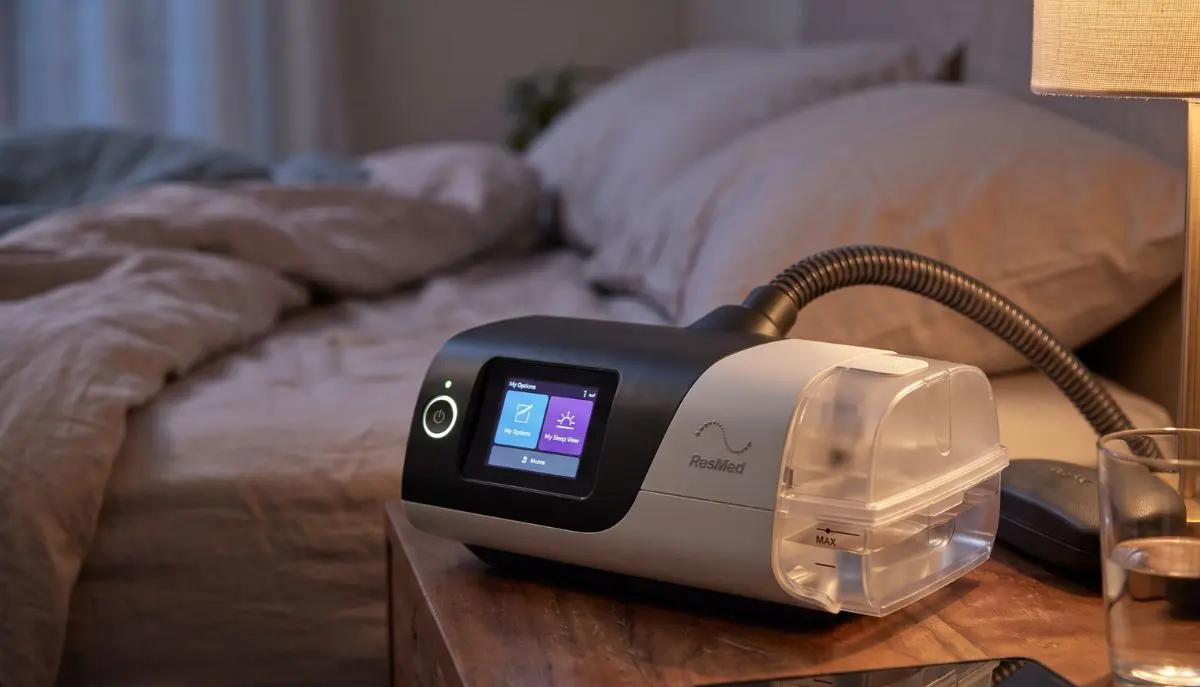
ResMed AirSense 11 AutoSet CPAP Machine with HumidAir:
Getting used to CPAP therapy can take time. Some people adjust quickly, while others need to find the right mask, airflow settings, and humidity level to feel comfortable throughout the night. Choosing the right equipment can make this process easier.
The ResMed AirSense 11 AutoSet CPAP Machine with HumidAir is designed to support people with obstructive sleep apnea (OSA) by delivering prescribed air pressure during sleep. Its integrated HumidAir humidifier adds moisture to the airflow, which may help reduce dryness in the nose and throat for some users.
At Alfa Healthcare Supply Inc., we understand that choosing sleep therapy equipment can feel confusing, especially when you are comparing different CPAP machines and accessories. This guide explains how the machine works, what its main features offer, how to care for it, and what to consider before purchasing it.
What is the ResMed AirSense 11 AutoSet CPAP Machine with HumidAir?
The ResMed AirSense 11 AutoSet CPAP Machine with HumidAir is an automatic positive airway pressure (APAP) device designed for eligible patients with obstructive sleep apnea. It delivers pressurized air through a compatible CPAP mask to help keep the upper airway open during sleep.
Unlike a basic fixed-pressure CPAP machine, the AutoSet algorithm can automatically adjust air pressure within the prescribed range in response to detected breathing events. Your clinician determines the appropriate therapy settings based on your individual needs.
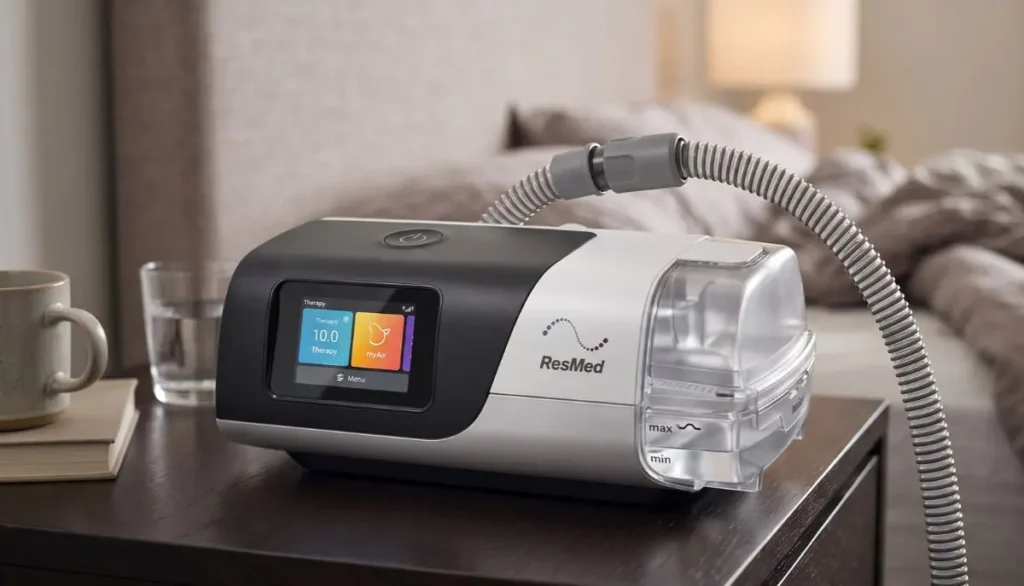
HumidAir is ResMed’s integrated humidification system. It adds moisture to the air delivered through the breathing circuit, helping address discomfort associated with dry airflow.
The machine combines automated pressure delivery, a touchscreen interface, and optional connected features in a compact device intended for regular home use.
Key Features of the ResMed AirSense 11 AutoSet CPAP Machine with HumidAir
Understanding the machine’s features can help you decide whether it fits your prescribed sleep therapy and daily routine.
1. AutoSet Automatic Pressure Adjustment
One of the main features of the ResMed AirSense 11 AutoSet CPAP Machine with HumidAir is its automatic pressure-adjustment technology.
During sleep, your breathing patterns may change. The AutoSet algorithm responds to detected breathing patterns by adjusting pressure within the range configured by your healthcare professional.
This can provide a more responsive therapy experience than a fixed-pressure device. However, automatic adjustment does not replace professional diagnosis, prescription, or follow-up care.
2. Integrated HumidAir Humidifier
Dry air can cause a dry mouth, irritated nose, or an uncomfortable throat for some CPAP users. The integrated HumidAir humidifier adds moisture to the therapy airflow.
Depending on your environment and personal comfort, humidification may help make nightly therapy more pleasant.
The amount of humidity you need can vary with room temperature, climate, mask type, and individual sensitivity. Follow the manufacturer’s instructions when adjusting humidity settings and cleaning the water tub.
3. Easy-to-Use Touchscreen
Learning a new medical device should not feel unnecessarily difficult. The AirSense 11 features a color touchscreen that provides access to supported settings, therapy information, and comfort options.
The interface helps users navigate everyday tasks more easily, while the available settings vary based on the device setup and prescribed therapy.
Patients should not make any changes to clinical pressure settings on their own, without the guidance of their healthcare professional.
4. Ramp and Comfort Settings
Some users find it uncomfortable to begin therapy at their full prescribed pressure immediately. The ramp feature can gradually increase pressure over a configured period, helping users settle into sleep.
The machine also offers supported comfort features, which may include expiratory pressure relief. Availability and configuration can depend on the prescribed setup.
These options may help improve comfort, but they do not guarantee that every user will find CPAP therapy easy from the first night.
5. Sleep Tracking and Connected Features
AirSense 11 can provide information related to therapy that helps users and clinicians review various aspects of treatment—such as usage and available therapy indicators.
Depending on the model, region, connectivity, and account setup, supported features may include wireless data transfer and access to compatible ResMed apps or services.
Connectivity and app availability can vary. Before relying on any specific feature, check the exact configuration of the product and the availability of local service.
How Does the HumidAir System Help?
The humidifier is an important consideration for people who experience dryness while using CPAP equipment.
When air moves through a CPAP system, it can feel dry to some users, particularly in air-conditioned rooms or during colder weather. HumidAir adds moisture to the airflow before it reaches the mask.
Potential benefits include:
- Helping relieve dryness in the nose and throat.
- Improving comfort during overnight therapy for some users.
- Supporting a more comfortable CPAP routine.
- Offering adjustable humidification options when supported by the device settings.
Humidification does not treat every cause of nasal congestion or mouth dryness. If symptoms continue, speak with your healthcare professional to review your mask fit, breathing patterns, medications, or other possible causes.
Who May Benefit from This CPAP Machine?
The ResMed AirSense 11 AutoSet CPAP Machine with HumidAir may be appropriate for adults who have been diagnosed with obstructive sleep apnea and have a prescription for compatible positive airway pressure therapy.
It might be beneficial if you speak with your doctor.:
- Need an AutoSet device that adjusts pressure within a prescribed range.
- Experience dryness while using CPAP therapy.
- Prefer a touchscreen rather than a more basic control interface.
- Want access to supported therapy tracking features.
- A machine is required to perform sleep therapy regularly at home.
The best machine depends on your diagnosis, prescribed pressure requirements, mask compatibility, medical history, and clinician recommendations. Not every CPAP device is appropriate for every patient.
How to Set Up the ResMed AirSense 11 AutoSet CPAP Machine with HumidAir
Correct setup helps you use your equipment safely and consistently. Always follow the official user guide and the instructions supplied with your device.
Step 1: Choose a Suitable Location
Place the machine on a stable, level surface near your bed. Keep the air inlet clear and position the device so that it can receive adequate airflow.
Avoid placing it where it could fall, become blocked by bedding, or be exposed to water.
Step 2: Fill the HumidAir Water Tub
If you are using the humidifier, remove the water tub according to the manufacturer’s instructions and fill it with the recommended water type up to the marked maximum level.
Do not overfill the tub. Reinstall it securely before starting therapy.
Step 3: Connect the CPAP Tubing
Connect the appropriate breathing tubing to the machine’s air outlet. If you are using heated tubing, ensure that it is compatible with the specific configuration of your device.
Check that the connections are secure and that the tubing is not bent, crushed, or blocked.
Step 4: Attach Your CPAP Mask
Connect the tubing to a compatible mask. ResMed offers several mask styles, including nasal masks, nasal pillow masks, and full-face masks.
Your mask should fit comfortably and form a proper seal. Instead of overtightening the straps, follow the fitting instructions provided by the mask manufacturer.
Step 5: Review Your Settings
Power on the device and check the available user settings. Make sure the therapy settings match the configuration prescribed by your physician.
If you are unsure about pressure settings, humidification, or ramp options, contact your healthcare provider or qualified equipment supplier for assistance.
Step 6: Begin Therapy as Instructed
Put on your mask, lie in your usual sleeping position, and start therapy according to the machine’s instructions. Check for significant air leaks and make sure the tubing is not pulling on your mask.
If breathing feels uncomfortable or you experience persistent problems, seek professional guidance instead of changing prescribed settings on your own.
Tips for Getting More Comfortable with CPAP Therapy
A consistent routine can make it easier to adjust to CPAP treatment.
Find a comfortable mask fit. A mask that is too tight may cause pressure marks, while a loose mask may leak air. Try different compatible mask styles with professional guidance if needed.
Adjust humidity thoughtfully. If you experience dryness, review the available humidification options. If you notice condensation in the tubing or mask, ask your equipment provider about appropriate humidity and temperature adjustments.
Keep the equipment clean. Regular cleaning helps remove residue and supports good equipment hygiene. Follow the device and mask manufacturers’ recommended cleaning schedules.
Give yourself time to adjust. Wearing a CPAP mask might feel a bit strange at first. Following a routine—gradually adopted as per your doctor’s advice—can help you become comfortable with this treatment.
Attend follow-up appointments. Your healthcare professional can review your symptoms, therapy information, mask fit, and ongoing treatment needs.
Cleaning and Maintenance Guide
Regular care helps keep your equipment in good condition. Before cleaning, turn off and unplug the device as directed in the user guide.
Clean the HumidAir Water Tub
Empty the remaining water and clean the tub according to the manufacturer’s instructions. Allow the components to dry completely before reassembly.
Do not use cleaning products or methods that are not approved for the water tub.
Clean the CPAP Mask and Tubing
Clean the mask cushion, frame, and tubing according to their respective instructions. Use appropriate cleaning methods and allow these components to dry before reusing them.
Different mask components may have different care requirements.
Check the Air Filter
Check the air filter at the intervals specified in the user guide. Replace it if necessary, and ensure that you use the appropriate filter.
Inspect Components Regularly
Check the water tub, tubing, power supply, and mask for visible damage or wear. Replace damaged parts with compatible components.
Replacement schedules vary by component, manufacturer guidance, insurance coverage, and individual usage. Do not assume that all parts need replacement at the same interval.
ResMed AirSense 11 AutoSet CPAP Machine with HumidAir vs. a Basic CPAP Machine
Both automatic and fixed-pressure CPAP devices are used to treat sleep apnea when appropriately prescribed. The key difference is how air pressure is delivered throughout the therapy.
A fixed-pressure CPAP machine generally maintains a prescribed pressure, while an AutoSet device can adjust pressure within its clinician-configured range in response to detected breathing patterns.
The AirSense 11 also features an inbuilt humidifier, a touchscreen, and data-connectivity features. A basic machine may have a simpler interface or fewer comfort and connectivity options.
Having more facilities does not automatically mean that every patient will achieve better outcomes. Your diagnosis, prescription, comfort needs, and ability to use the device consistently are more important than the number of features alone.
What to Check Before Buying
Before purchasing the ResMed AirSense 11 AutoSet CPAP Machine with HumidAir, review these important details:
- Prescription requirements: Confirm the prescription and documentation needed for your device and location.
- Exact model: Verify that the product is the AutoSet version and includes the humidification components described in the listing.
- Mask compatibility: Check that your preferred mask and tubing are compatible.
- Included accessories: Confirm whether the listing includes the water tub, tubing, power supply, mask, and other accessories. These may be sold separately.
- Warranty and support: Review the seller’s warranty, return policy, and available equipment support.
- Insurance coverage: Ask your insurer about eligibility, documentation, deductibles, and out-of-pocket costs before ordering.
Product bundles and availability can change. Confirm the current listing details rather than assuming that every package includes identical accessories.
Why Choose Alfa Healthcare Supply Inc.?
Finding the right medical equipment involves more than selecting a product name. Customers may also need help understanding compatibility, replacement supplies, documentation, and delivery options.
Alfa Healthcare Supply Inc. is a medical supply and durable medical equipment supplier serving customers in Floral Park and surrounding New York communities. Its product categories include CPAP-related supplies and other home healthcare products.
When considering a CPAP purchase, customers can review the product information available on the website and contact the supplier with questions about the exact model, included components, ordering requirements, and delivery arrangements.
For the ResMed AirSense 11 AutoSet CPAP Machine with HumidAir, confirming these details before ordering can help you make a more informed choice and avoid purchasing incompatible accessories.
Visit Alfa Healthcare Supply Inc. to explore available medical supplies and review current product information.
Final Thoughts: ResMed AirSense 11 AutoSet CPAP Machine with HumidAir
The ResMed AirSense 11 combines automatic pressure adjustment, a touchscreen interface, and integrated HumidAir humidification in a modern CPAP therapy device. For eligible patients, these features may support a more comfortable and manageable sleep therapy routine.
Choosing equipment should always begin with the right diagnosis and prescription. Take time to confirm the model, included accessories, mask compatibility, maintenance requirements, and supplier support before making a purchase.
Alfa Healthcare Supply Inc. aims to help customers find medical supplies that meet their needs. By understanding how the machine works and how to care for it, you can have a more informed conversation with your healthcare professional and make a decision that supports your prescribed sleep therapy.
Frequently Asked Questions: ResMed AirSense 11 AutoSet CPAP Machine with HumidAir
1. What is the ResMed AirSense 11 AutoSet CPAP Machine with HumidAir used for?
It is an automatic positive airway pressure device designed to treat obstructive sleep apnea in appropriately diagnosed patients. It delivers pressurized air through a compatible mask to help keep the airway open during sleep.
2. What does HumidAir do on the AirSense 11?
HumidAir is the integrated humidification system. It adds moisture to therapy airflow and may help reduce dryness in the nose and throat for some users.
3. Does the AirSense 11 AutoSet adjust air pressure automatically?
Yes. The AutoSet algorithm can adjust pressure within the range configured by the healthcare professional in response to detected breathing patterns. It does not replace a prescription or professional follow-up.
4. Can I use my existing CPAP mask with the AirSense 11?
Many compatible CPAP masks can be used with the AirSense 11. Confirm the tubing connection, mask requirements, and device configuration before using an existing mask.
5. What type of water should I use in the HumidAir water tub?
Follow the official ResMed user guide for your specific model and region. Use the recommended water type and never fill the tub above its maximum marking.
6. How often should I clean the AirSense 11 humidifier?
Follow the cleaning schedule in the official user guide. Empty and clean the water tub as instructed, and allow it to dry before reinstalling it.
7. Can I adjust the pressure settings myself?
Clinical pressure settings should be managed by your healthcare professional. You may be able to adjust certain user-level comfort settings, depending on your device configuration and instructions.
8. Is the AirSense 11 AutoSet suitable for every person with sleep apnea?
No. The appropriate device depends on your diagnosis, prescribed treatment, and individual medical needs. Ask your healthcare professional whether an AutoSet device is right for you.
9. Does the machine include a mask and tubing?
Package contents vary by seller and product bundle. Review the exact listing and confirm which accessories are included before purchasing.
10. Where can I learn more about the product?
Visit Alfa Healthcare Supply Inc. at https://alfahealthcaresupplyinc.com/ to review available product information and contact the supplier about current availability, included accessories, and ordering requirements.